
A Deep Dive into Redis's Architecture
Under the Hood: How Redis Delivers < 1ms Latency

A technical deep dive into single-threaded execution, advanced data structures, and memory management.
In software architecture, balancing strict ACID compliance with high-throughput performance represents a core engineering trade-off. While RDBMS solutions like PostgreSQL or MySQL ensure robust data integrity, they are frequently bottlenecked by latency and transaction logging overhead when operating on persistent storage, constraining throughput compared to in-memory systems.
Note: Transaction logging in PostgreSQL is primarily implemented through a mechanism called Write-Ahead Logging (WAL). The central concept of WAL is to ensure data integrity and durability by recording all changes to the database in a sequential log file before they are applied to the main data files (tables and indexes)

Enter Redis (Remote Dictionary Server). Redis is designed for speed, offering sub-millisecond latency by operating in-memory rather than relying on disk storage. Let’s look under the hood to see how it achieves this performance.

1. The Core Architecture. The Single-Threaded Superpower
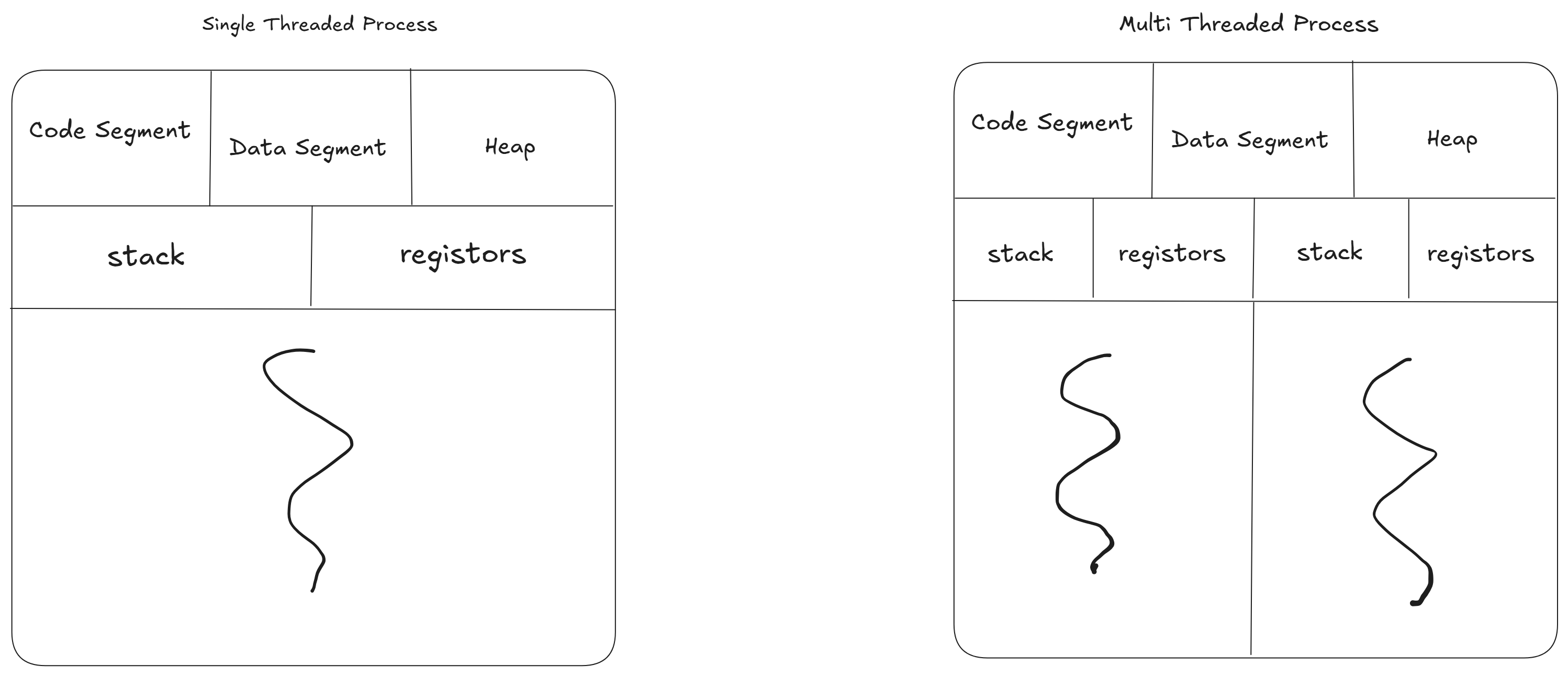
The most counterintuitive—and brilliant—aspect of Redis is that its core command execution engine is single-threaded. In an era of multi-core processors, this sounds like a massive bottleneck. Why would a high-performance database only use one thread to process data?
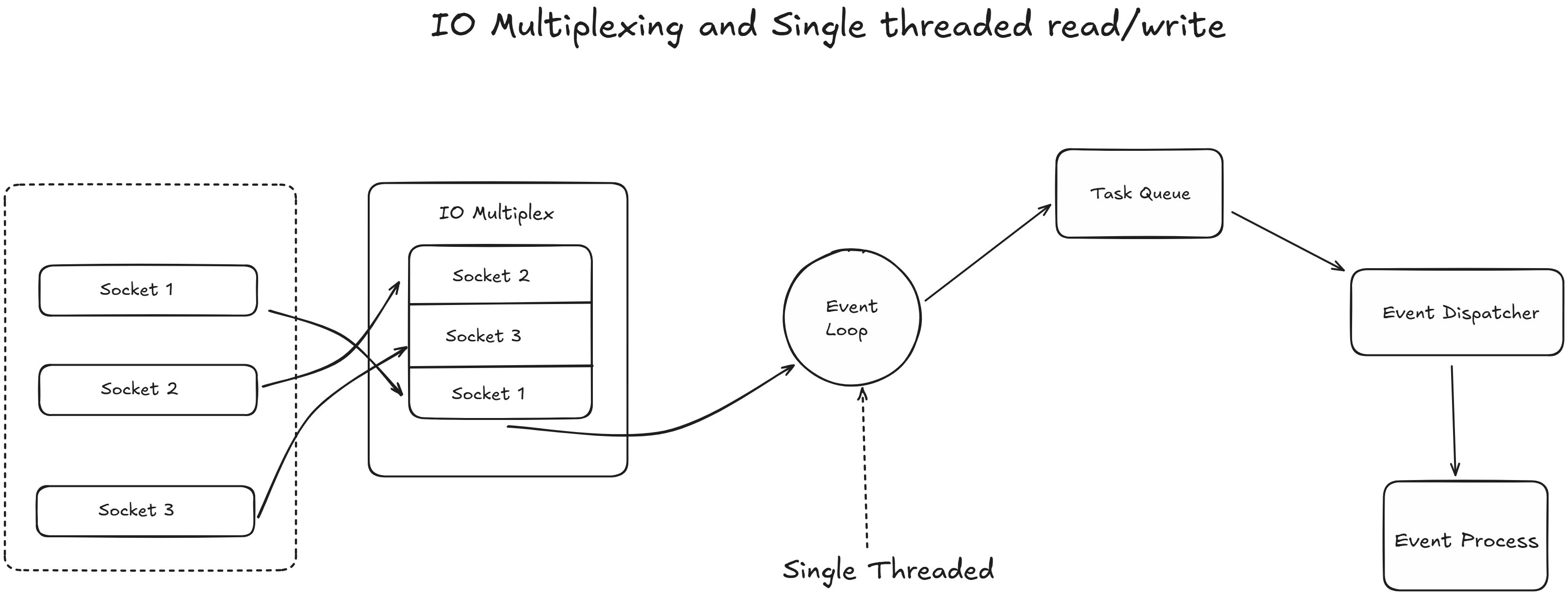
The answer lies in C10K and I/O Multiplexing.
No Context Switching. Because there is only one thread processing commands, Redis never has to waste CPU cycles switching between threads.
No Lock Contention. In multi-threaded databases, threads have to lock data to prevent race conditions (two users updating the same record simultaneously). Redis avoids this entirely. Every operation is inherently atomic.
I/O Threads (The Modern Twist). While the actual command execution is single-threaded, modern Redis (since version 6) offloads network reads and writes to multiple background I/O threads. This parallelizes the parsing of network traffic while keeping the actual data manipulation strictly sequential.
2. Memory Management. What Happens When the RAM Fills Up?
RAM is expensive and finite. Because Redis stores everything in-memory, you will eventually hit your physical limit. When your memory usage reaches 100%, Redis doesn’t just crash; it relies on its Eviction Policies.
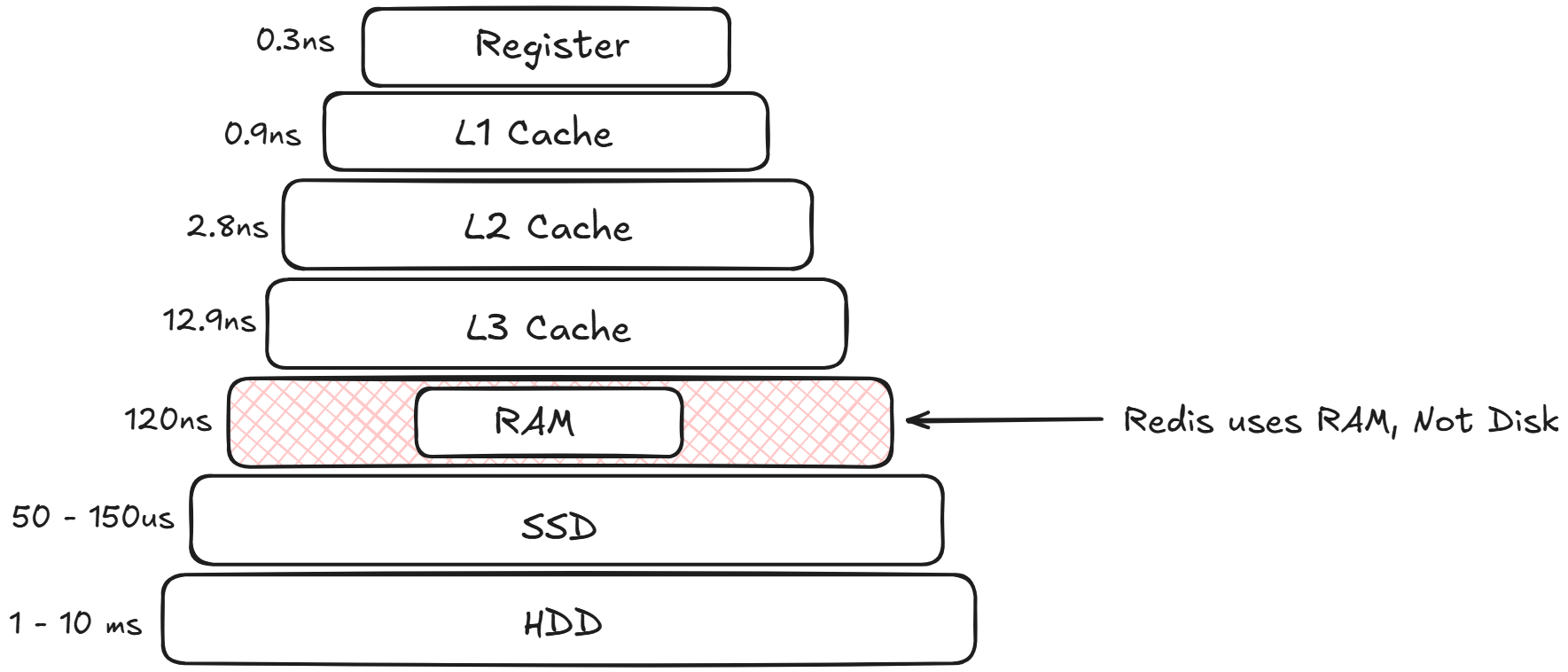
When you configure a Redis instance, you typically set a maxmemory directive in your redis.conf file. This tells Redis, “Do not use more than X gigabytes of RAM.”
But what exactly happens in the milliseconds after that threshold is breached? Redis doesn’t just crash, nor does it bring down your host operating system. Instead, a highly optimized survival mechanism kicks in.
1. The First Line of Defense. Expiration (TTL)
Before we even talk about forced eviction, it’s important to understand how Redis cleans up data under normal circumstances. When developers set a key in Redis, they often give it a Time-To-Live (TTL)—an expiration clock.
Redis uses two clever methods to clear out these expired keys without wasting precious CPU cycles:
Passive Expiration. Redis is lazy. It doesn’t actively watch the clock for every key. Instead, when a client tries to access a key, Redis checks if it has expired. If it has, Redis deletes it on the spot and returns a null value.
Active Expiration. Passive expiration isn’t enough; if an expired key is never accessed again, it would sit in RAM forever. To fix this, Redis runs a background process 10 times per second. It tests a random sample of keys with TTLs. If a key is expired, it gets deleted. If more than 25% of the sampled keys were expired, the process immediately runs again.
𝐋𝐞𝐚𝐫𝐧 𝐭𝐨 𝐛𝐮𝐢𝐥𝐝 𝐆𝐢𝐭, 𝐃𝐨𝐜𝐤𝐞𝐫, 𝐑𝐞𝐝𝐢𝐬, 𝐇𝐓𝐓𝐏 𝐬𝐞𝐫𝐯𝐞𝐫𝐬, 𝐚𝐧𝐝 𝐜𝐨𝐦𝐩𝐢𝐥𝐞𝐫𝐬, 𝐟𝐫𝐨𝐦 𝐬𝐜𝐫𝐚𝐭𝐜𝐡. Get 40% OFF CodeCrafters: https://app.codecrafters.io/join?via=the-coding-gopher
2. The Eviction Trigger. Hitting the maxmemory Wall
Despite expiration, a high-traffic application can still fill up the allocated RAM. When a client sends a new write command (like SET or LPUSH) and the maxmemory limit has been reached, the normal execution flow is interrupted.
SETandLPUSHare distinct commands used for different data structures and purposes.SETis used for simple key-value string storage, whileLPUSHis used to add elements to the beginning (left) of a list.
Here is the exact sequence of events:
Command Interception. Redis pauses the execution of the incoming write command.
Eviction Algorithm Runs. Redis checks your configured eviction policy (e.g.,
allkeys-lru).allkeys-lruis a data eviction policy that removes the least recently used keys—regardless of whether they have an expiration time set—when the maximum memory limit (maxmemory) is reached. It is a recommended default for caching scenarios where you want to keep frequently accessed data, even if it has no TTL.
Memory Reclaimed. Redis deletes enough existing keys to drop the memory usage back below the
maxmemorylimit.Command Execution. Only after the memory is freed does Redis finally execute the user’s original write command.
If your eviction policy is set to noeviction, Redis skips steps 2 and 3 and simply replies to the client with an Out Of Memory (OOM) error, effectively making the database read-only until memory is manually freed.
3. The “Approximated” LRU Secret
If your policy is set to allkeys-lru (Least Recently Used), you might assume Redis keeps a strict, chronologically ordered linked list of every key to know exactly which one is the oldest.
It doesn’t.
Maintaining a strict LRU list for millions of keys would consume a massive amount of extra RAM and CPU—the exact resources Redis is trying to conserve. Instead, Redis uses an Approximated LRU algorithm.
When it needs to evict data, Redis randomly samples a handful of keys (usually 5, but this is configurable via maxmemory-samples). It looks at the internal timestamp of those 5 specific keys, finds the one that was accessed longest ago, and deletes it.
While not 100% mathematically perfect, this randomized sampling is incredibly close to true LRU behavior and requires almost zero overhead. Starting in Redis 3.0, the algorithm was improved with an “eviction pool,” making the approximation even more accurate without sacrificing performance.
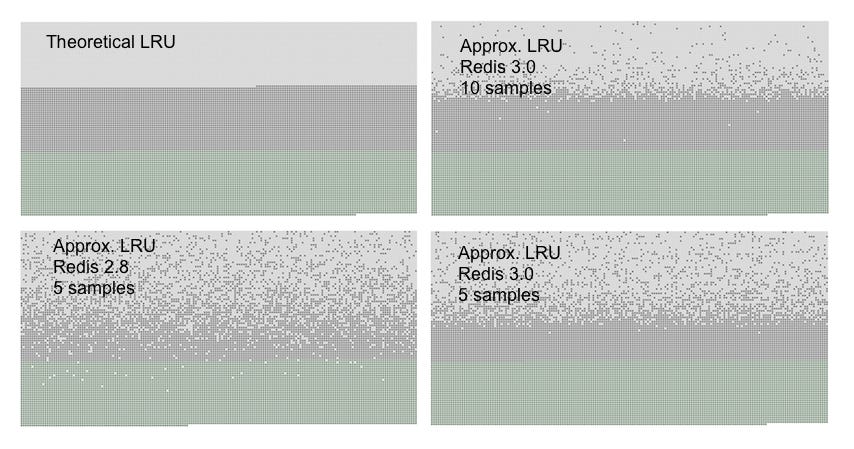
You can see three kind of dots in the graphs, forming three distinct bands.
The light gray band are objects that were evicted.
The gray band are objects that were not evicted.
The green band are objects that were added.
In a theoretical LRU implementation we expect that, among the old keys, the first half will be expired. The Redis LRU algorithm will instead only probabilistically expire the older keys.
As you can see Redis 3.0 does a better job with 5 samples compared to Redis 2.8, however most objects that are among the latest accessed are still retained by Redis 2.8. Using a sample size of 10 in Redis 3.0 the approximation is very close to the theoretical performance of Redis 3.0.
3. Beyond Simple Caching. Advanced Data Structures
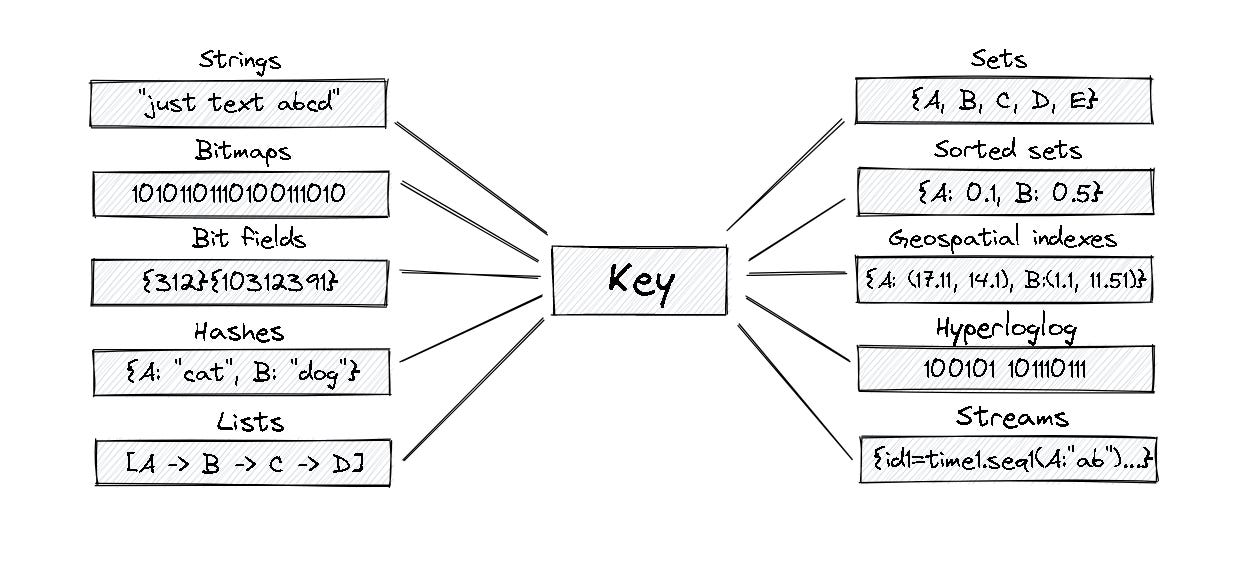
Redis is often mistakenly called a simple “key-value” cache. It is actually a data structure server. By manipulating complex data structures directly in memory, you save immense amounts of computing power on your application side.
Bitmaps. Want to track daily active users for millions of users using only a few megabytes of RAM? Bitmaps allow you to flip individual bits (0 or 1) mapped to user IDs.
HyperLogLog. A probabilistic data structure used to count unique things (like unique website visitors) with incredible speed and a fixed, tiny memory footprint (usually 12KB), at the cost of a standard error rate of ~0.81%.
Geospatial Indexes. Redis can store longitude and latitude data, allowing you to instantly query “find the 5 closest Uber drivers within a 3km radius.”
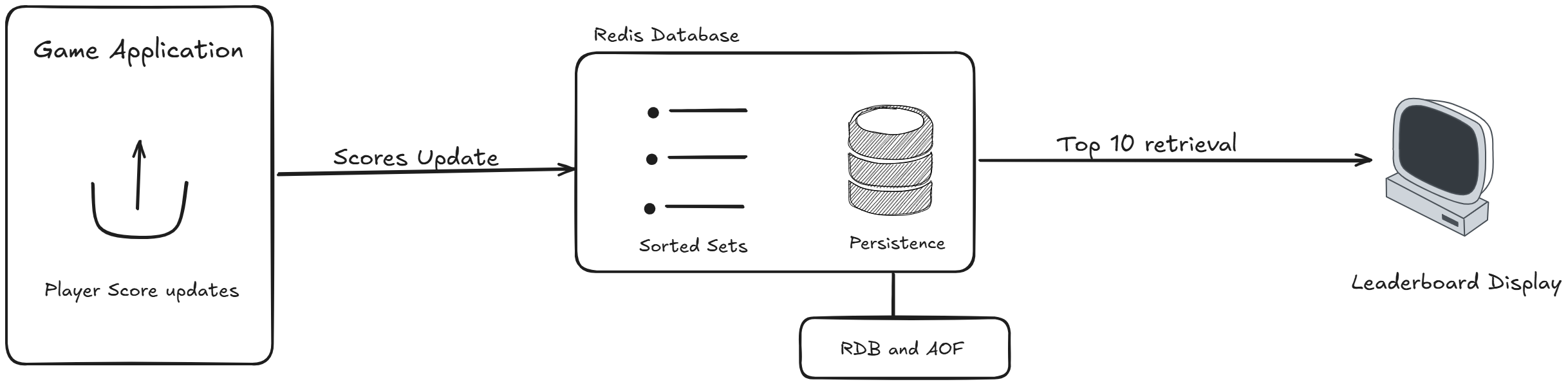
Sorted Sets (ZSET). Under the hood, this uses a combination of a hash map and a skip list. It allows you to maintain real-time, instantly queryable leaderboards for millions of players.
4. High Availability. Durability and Scaling
“If the server loses power, doesn’t RAM get wiped?” Yes, but Redis provides robust mechanisms to ensure you don’t lose your data.
Persistence Mechanisms
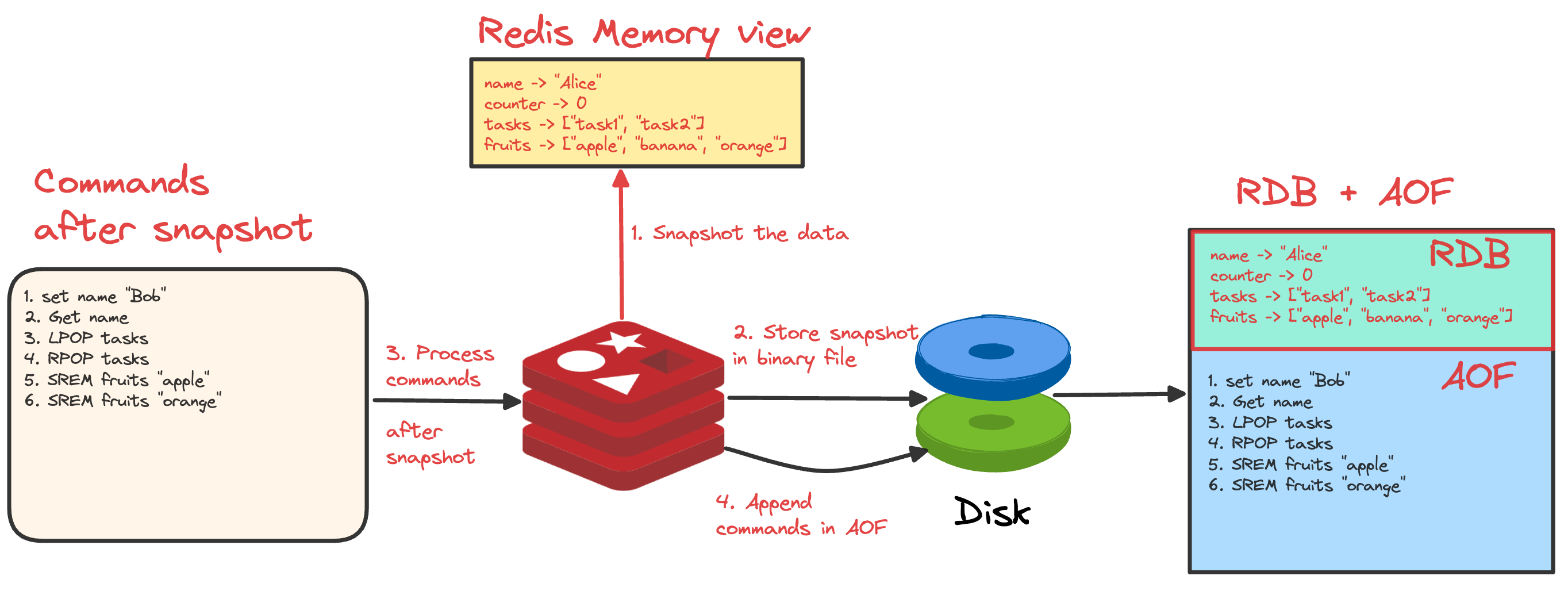
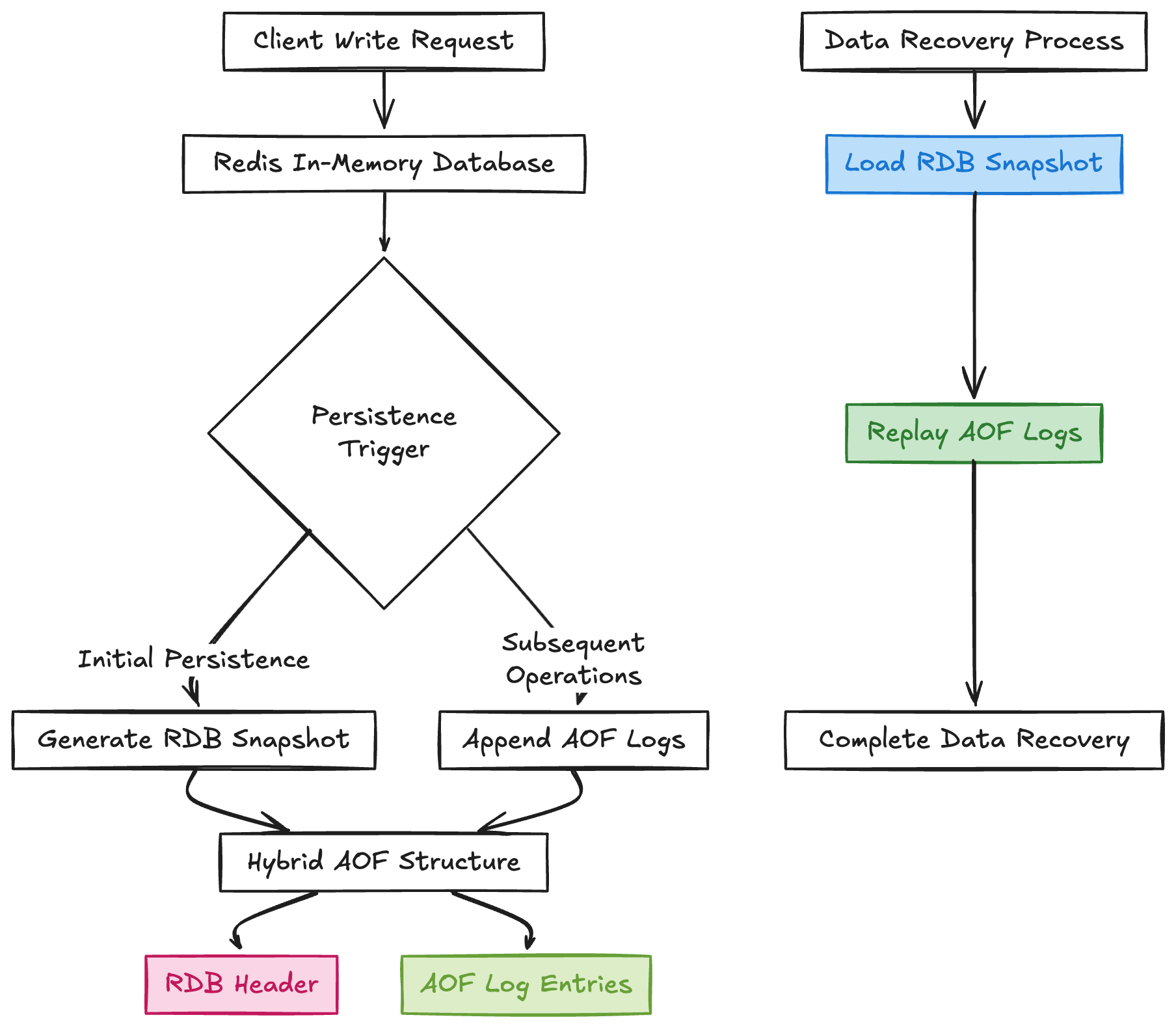
RDB (Redis Database Backup). Redis takes periodic, compact snapshots of your dataset at specific intervals and writes them to disk. It’s great for backups but you might lose a few minutes of data if it crashes between snapshots.
AOF (Append-Only File). Redis logs every single write operation to a file as it happens. If the server restarts, it simply replays the log to rebuild the exact state. It’s safer but slightly more resource-intensive. (Most production environments use a hybrid of RDB and AOF).
Scaling Out
When one server isn’t enough, Redis offers two primary topologies:
Redis Sentinel. Provides high availability. It actively monitors your Master and Replica nodes. If the Master dies, Sentinel automatically promotes a Replica to Master, ensuring zero downtime.
Redis Cluster. Provides horizontal scaling (sharding). It automatically splits your dataset across multiple nodes so you can scale your memory and CPU infinitely.
The Verdict
Redis is a masterclass in specialized engineering. By making strict architectural trade-offs—choosing memory over disk, single-threaded execution over complex locking, and offering specialized data structures—it provides unmatched speed. It takes the heavy lifting off your primary relational database, allowing your entire stack to handle massive, real-time workloads with ease.
yay