
I/O Bound or CPU Bound?
When Programs Wait and When They Work

“The fastest code is often the code that is not waiting.”
I remember the first time I deployed a Go service that called multiple APIs simultaneously. At first, it crawled along painfully. I thought maybe my CPU was too slow. Then I added a profiler and saw the truth: my program spent almost all its time sitting idle, waiting for responses from external services. That was my first real lesson in understanding what slows a program down. Some slowdowns happen because your code is doing too much thinking, and some happen because it is doing too little while waiting for the outside world.
These two scenarios define CPU bound and IO bound workloads.
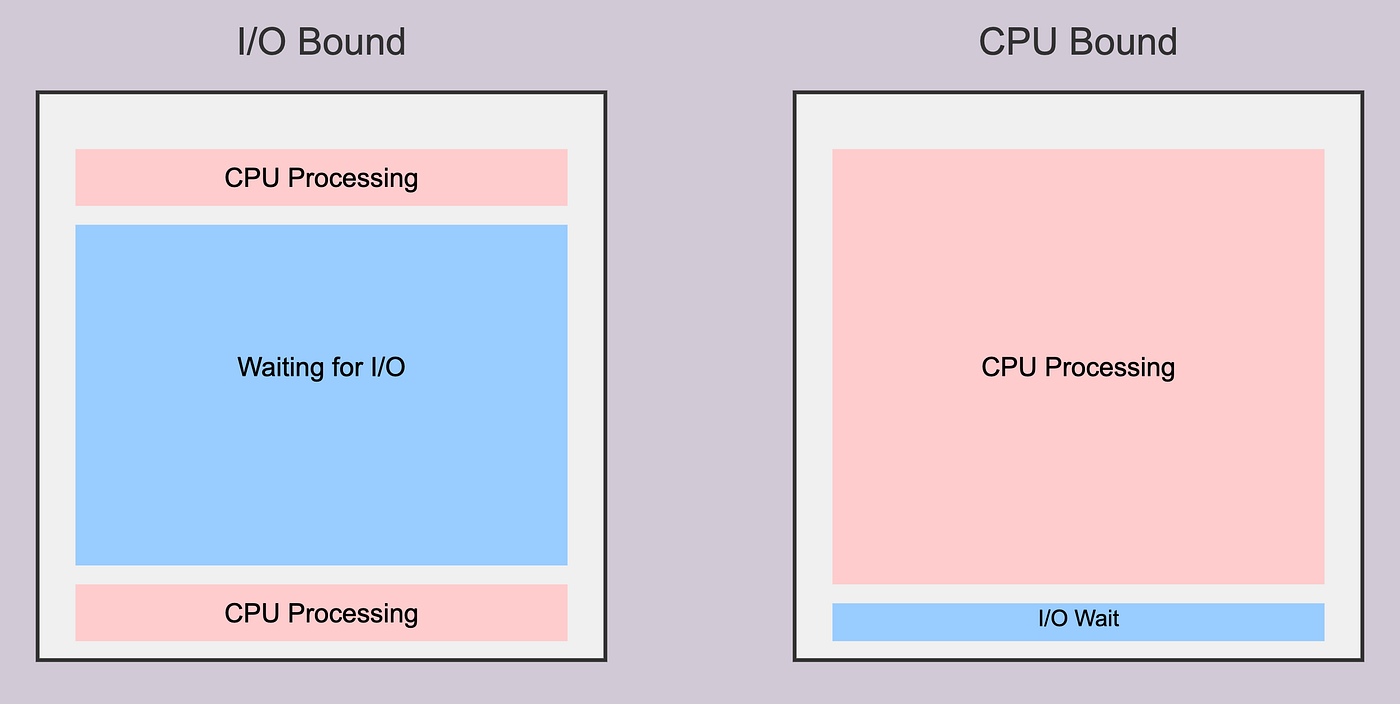
IO Bound Work. Waiting for the World to Catch Up
A program is IO bound when its speed is limited by how long it takes to interact with external systems. These systems might be disks, databases, networks, or even a user’s input. The CPU itself has no trouble keeping up—it is the external resource that introduces delays.
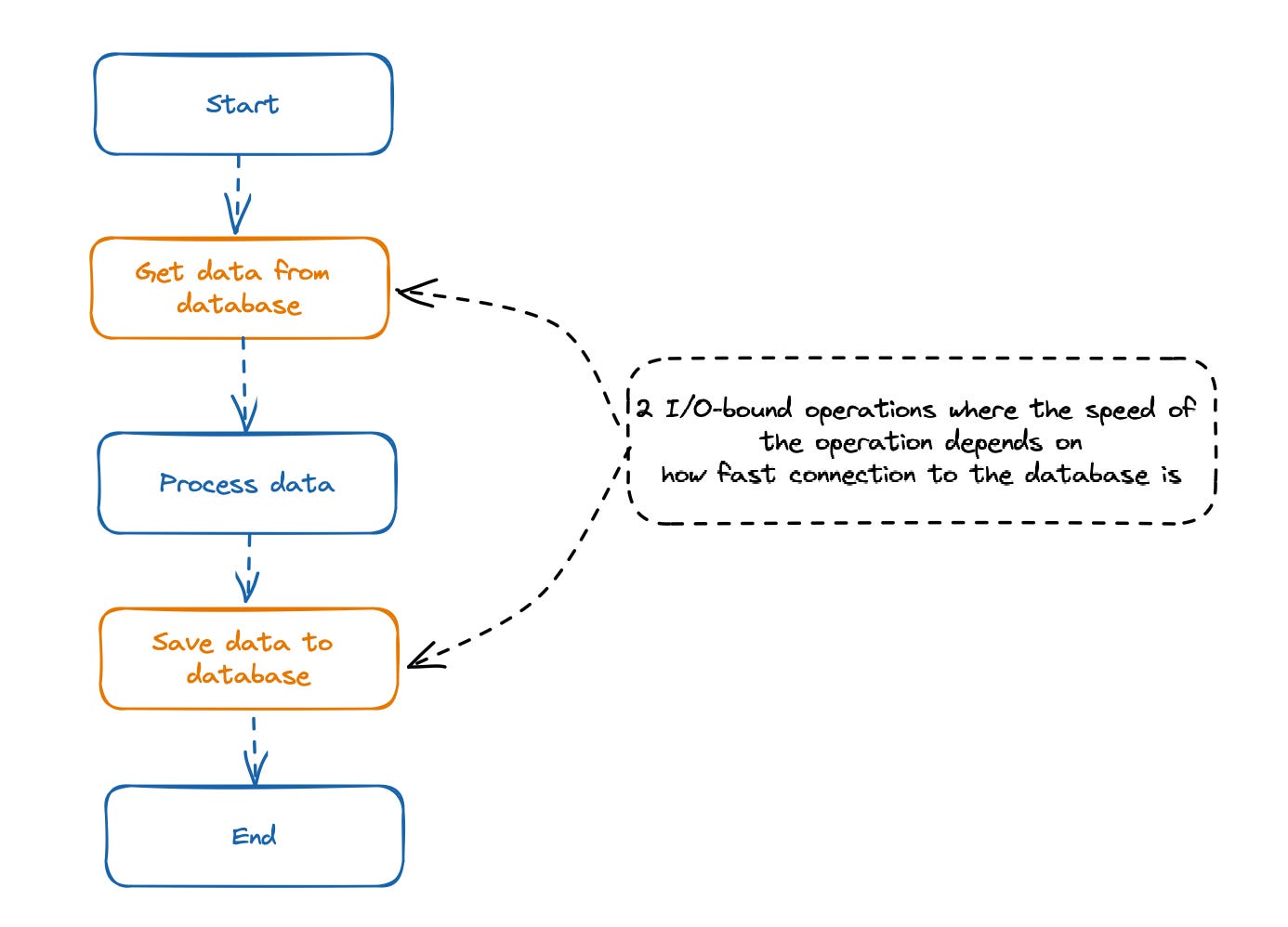
For example, imagine a Go service that fetches data from multiple APIs, processes the results, and stores them in a database. The CPU is idle while waiting for each HTTP request to return:
func fetchData(urls []string) []string {
    results := make([]string, len(urls))
    for i, url := range urls {
        resp, _ := http.Get(url)
        body, _ := io.ReadAll(resp.Body)
        results[i] = string(body)
    }
    return results
}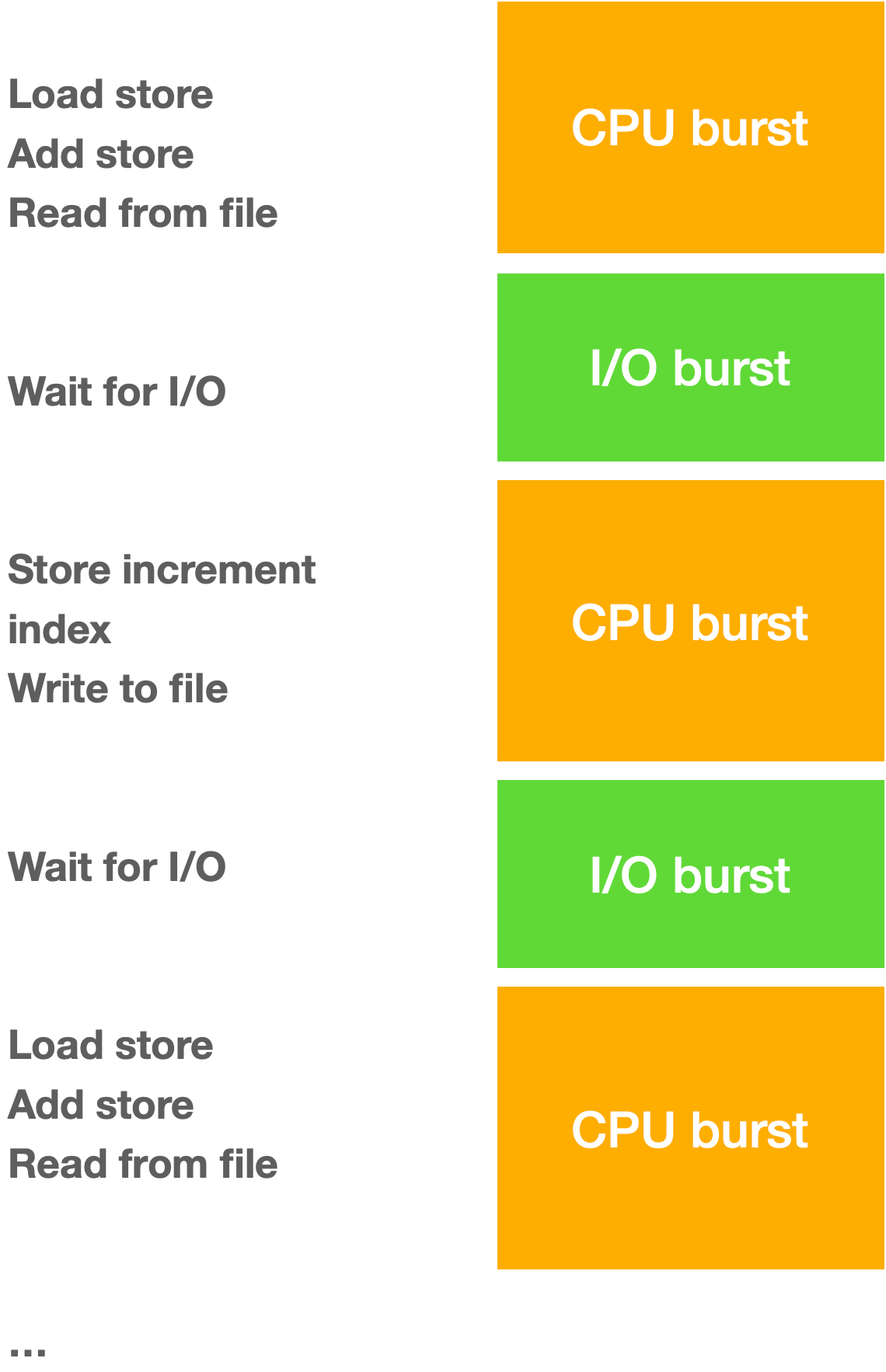
Most of the program’s time is spent in network reads. No matter how fast your CPU is, the program cannot move forward until the responses arrive. IO bound programs benefit from concurrency.
In Go, you can run multiple fetches in goroutines so the CPU stays productive while waiting:
func fetchDataConcurrently(urls []string) []string {
    results := make([]string, len(urls))
    var wg sync.WaitGroup
    for i, url := range urls {
        wg.Add(1)
        go func(i int, url string) {
            defer wg.Done()
            resp, _ := http.Get(url)
            body, _ := io.ReadAll(resp.Body)
            results[i] = string(body)
        }(i, url)
    }
    wg.Wait()
    return results
}
With concurrency, waiting time is hidden, and the program completes much faster.
Speeding up an I/O-bound program
Minimize the time spent waiting for I/O operations to complete. This can be achieved through several strategies.
1. Concurrency.
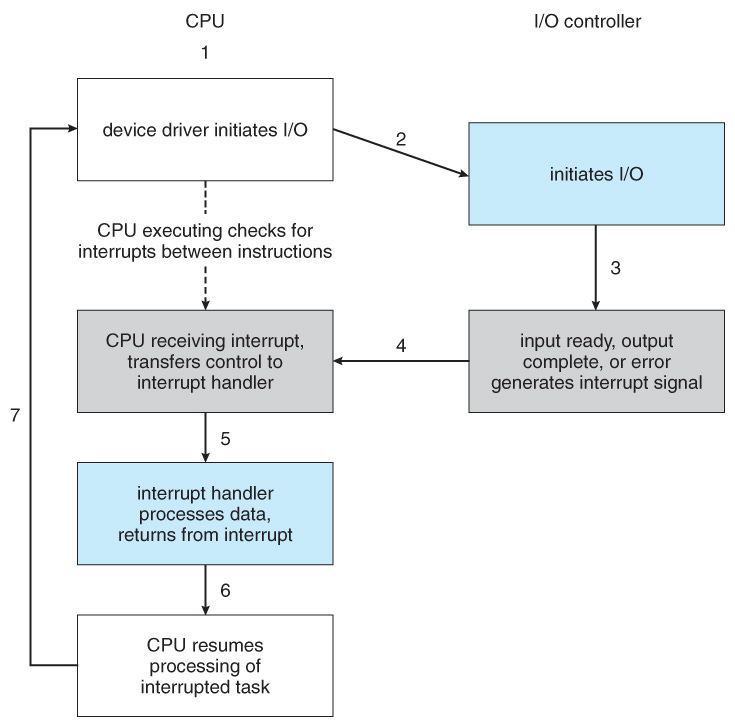
Asynchronous I/O (Async/Await). This is the most common and often most effective approach. Instead of blocking the main thread while waiting for an I/O operation (like reading a file or network request), asynchronous I/O allows the program to perform other tasks and be notified when the I/O operation is finished. This maximizes CPU utilization by overlapping I/O wait times with other work.
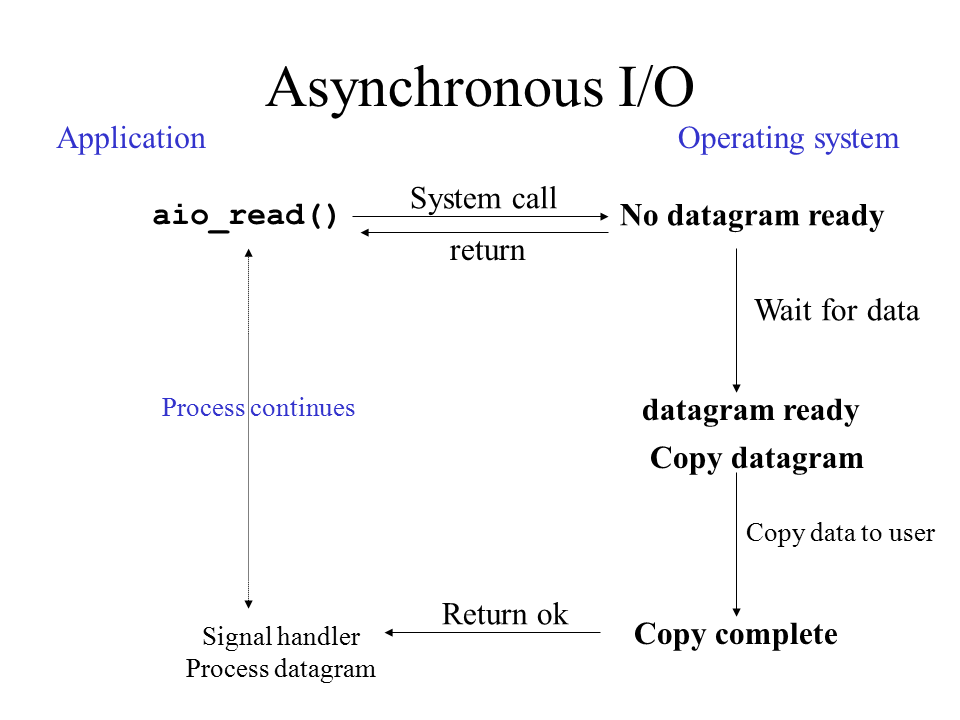
aio_read() refers to a function in the POSIX standard for performing asynchronous I/O (input/output) read operations. When a program calls
aio_read(), the request to read data from a file or device is queued, and the function returns immediately. The program can then continue with other tasks while the operating system handles the I/O operation in the background. Non-blocking. This contrasts with traditional, synchronousread()functions, where the program “blocks” (pauses) and waits until the data transfer is complete.
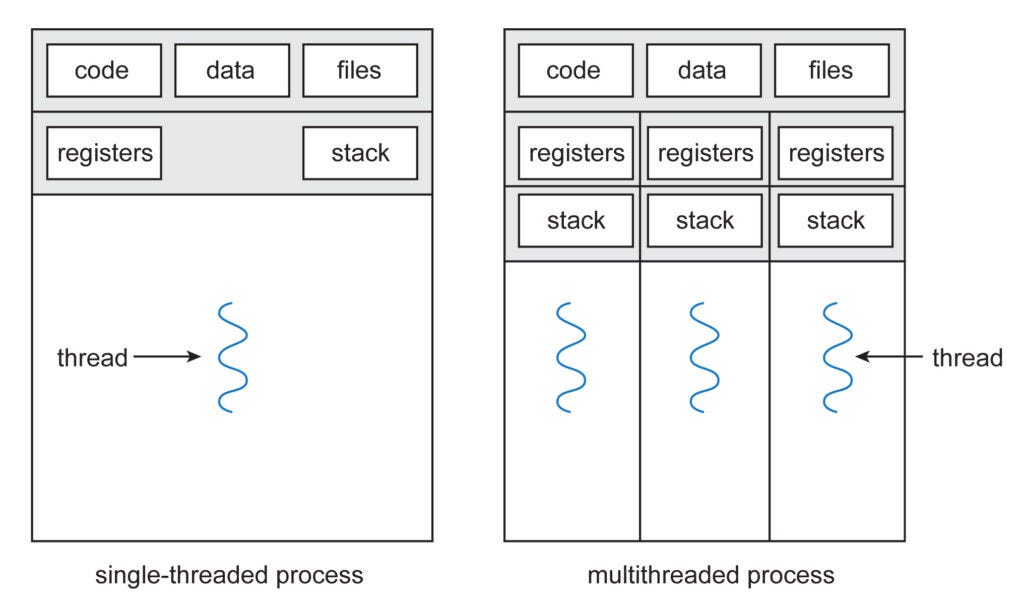
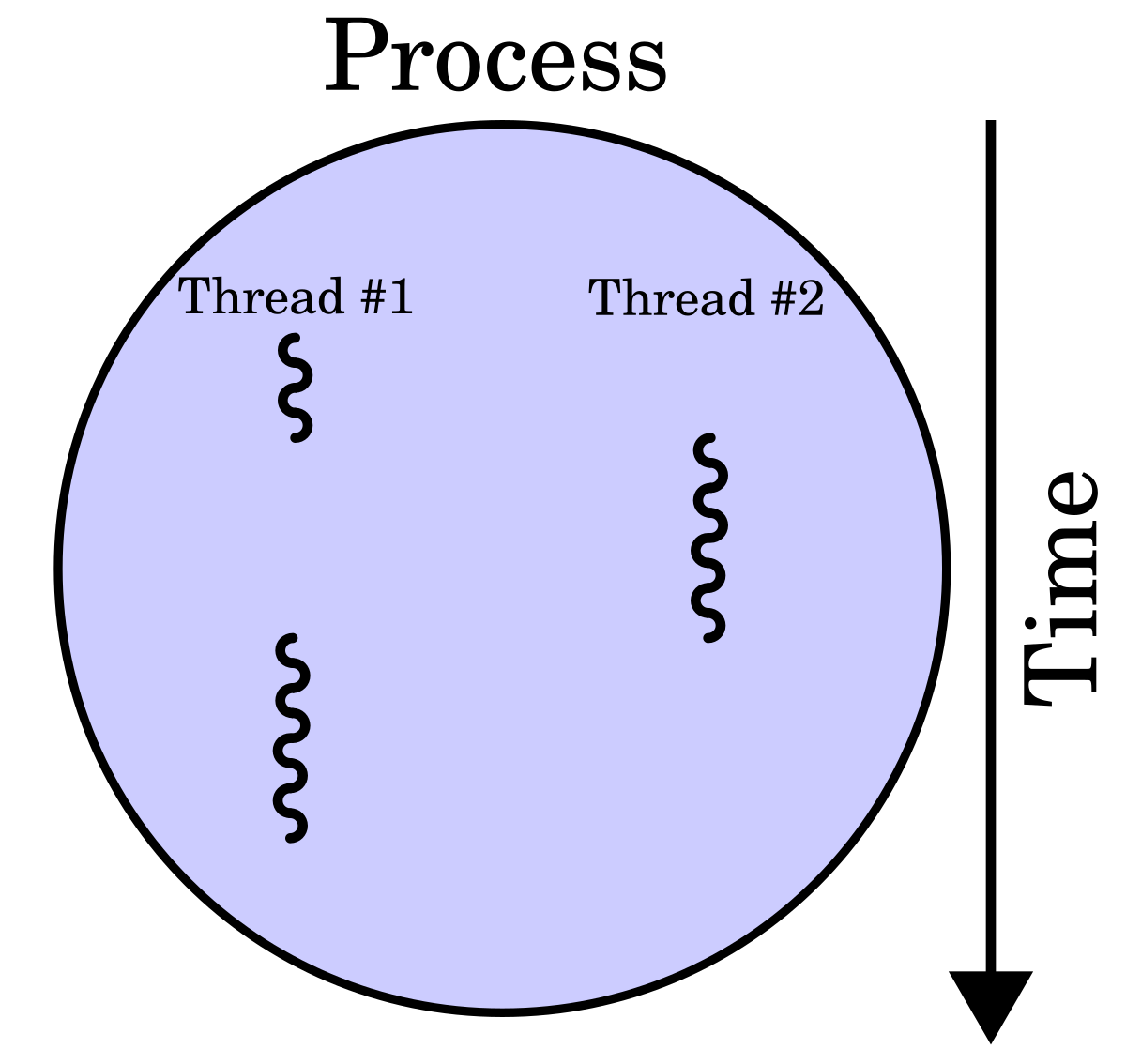
Multithreading. While less ideal in languages with a Global Interpreter Lock (GIL) like Python for CPU-bound tasks, multithreading can still be beneficial for I/O-bound tasks by allowing multiple I/O operations to run concurrently in different threads, provided the I/O operations themselves are not CPU-intensive.
Multithreading runs multiple tasks (threads) within a single process, sharing memory for efficiency and responsiveness (good for I/O); multiprocessing runs separate processes, each with its own memory (good for CPU-bound tasks on multi-core systems), leveraging multiple CPUs for true parallelism but incurring higher overhead for setup and communication between processes.
2. Optimize I/O Operations.
Batching Requests. If interacting with an external service or database, batching multiple requests into a single operation can significantly reduce the overhead of repeated network calls and waiting times.
Faster I/O Devices. Utilizing faster storage solutions (e.g., SSDs instead of HDDs) or optimizing network connections can directly reduce the time taken for data transfer.
Reduce Redundant I/O. Cache frequently accessed data in memory to avoid repeated reads from slower storage or network sources.
3. Efficient Data Handling.
Read/Write in Chunks. When dealing with large files, reading or writing data in larger, optimized chunks can reduce the number of individual I/O operations and associated overhead.
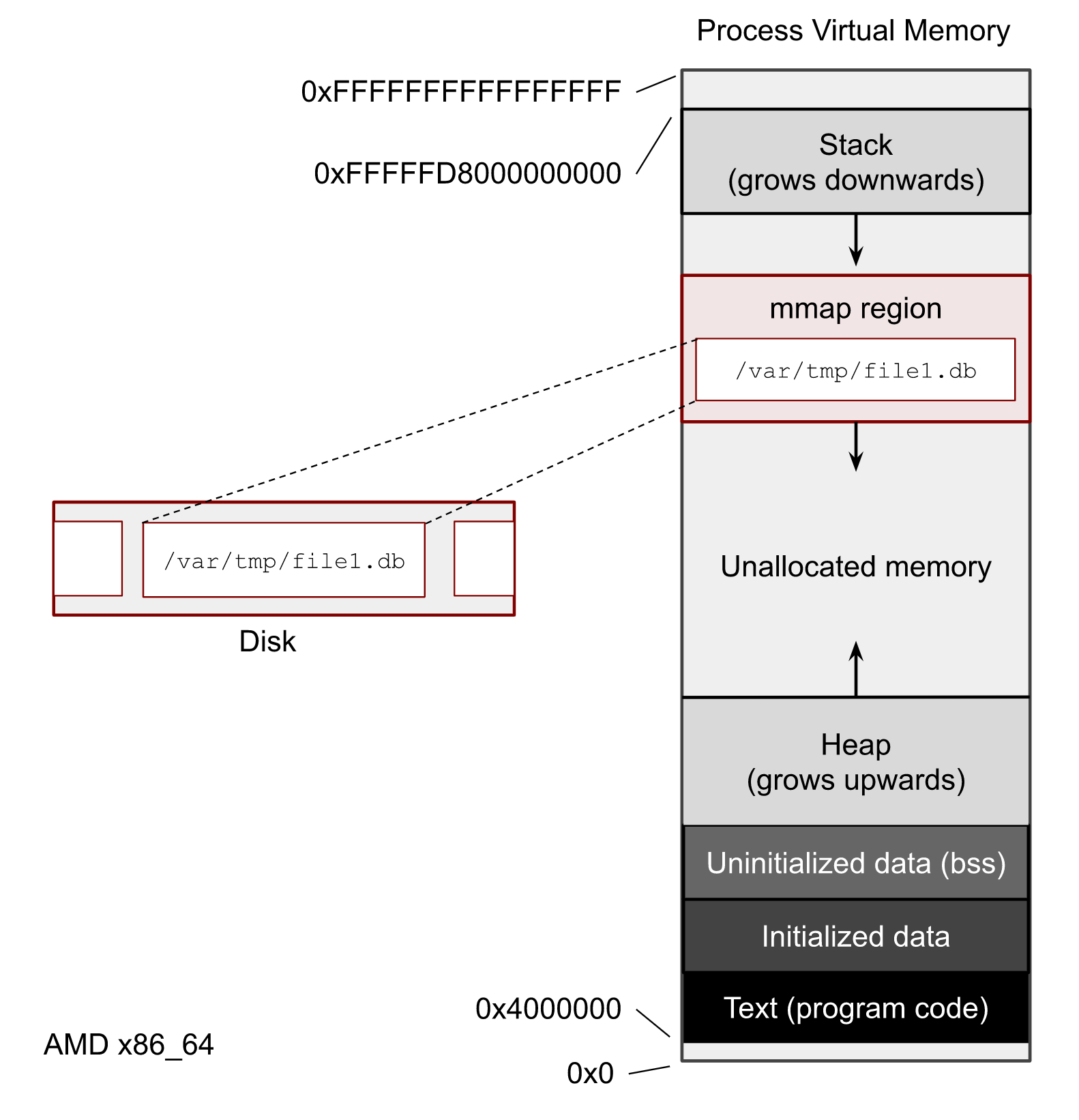
Memory Mapping (
mmap). For file I/O, memory mapping can create a direct mapping between a file on disk and a region of memory, allowing direct access to file content as if it were in memory, potentially improving performance.
mmapis a Unix system call that maps files or devices into a process’s virtual address space, allowing file I/O to be performed as memory access. This technique, known as memory-mapped file I/O, is more efficient than traditional read/write calls for large or sequential file access because it uses demand paging and avoids the overhead of switching between user and kernel modes. It can also be used to create shared memory regions between processes.
4. Profiling and Analysis.
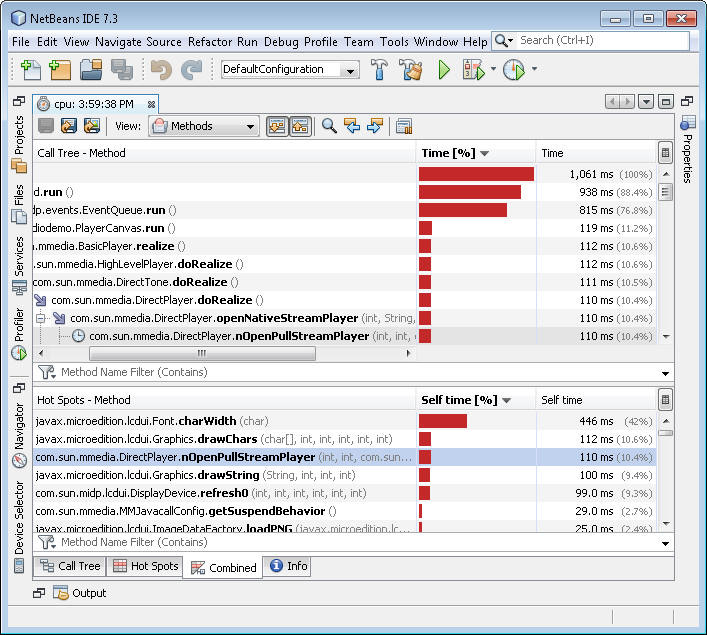
Identify Bottlenecks. Use profiling tools to pinpoint exactly where the program spends most of its time waiting for I/O. This helps in targeting optimization efforts effectively.
What it Measures.
Time. How long functions or lines of code take to execute.
CPU Usage. Which parts consume the most processor time.
Memory. Memory allocation and usage.
Function Calls. Frequency and duration of specific function calls.
CPU Bound Work
CPU bound programs are dominated by computation. They spend most of their time crunching numbers, performing calculations, or processing large datasets. The CPU is fully engaged and cannot go faster without either more cores or better algorithms.
Consider a Go program that performs image processing.
func invertColors(img image.Image) *image.RGBA {
    bounds := img.Bounds()
    inverted := image.NewRGBA(bounds)
    for y := bounds.Min.Y; y < bounds.Max.Y; y++ {
        for x := bounds.Min.X; x < bounds.Max.X; x++ {
            r, g, b, a := img.At(x, y).RGBA()
            inverted.Set(x, y, color.RGBA{
                R: uint8(255 - r/257),
                G: uint8(255 - g/257),
                B: uint8(255 - b/257),
                A: uint8(a / 257),
            })
        }
    }
    return inverted
}
Here, the program is always doing real work: calculating new pixel values for potentially millions of pixels. Adding concurrency may help if the work can be split across cores, but the main bottleneck is the CPU itself. Optimizing the algorithm, improving cache locality, or using specialized libraries can make a bigger difference than simply running multiple goroutines.
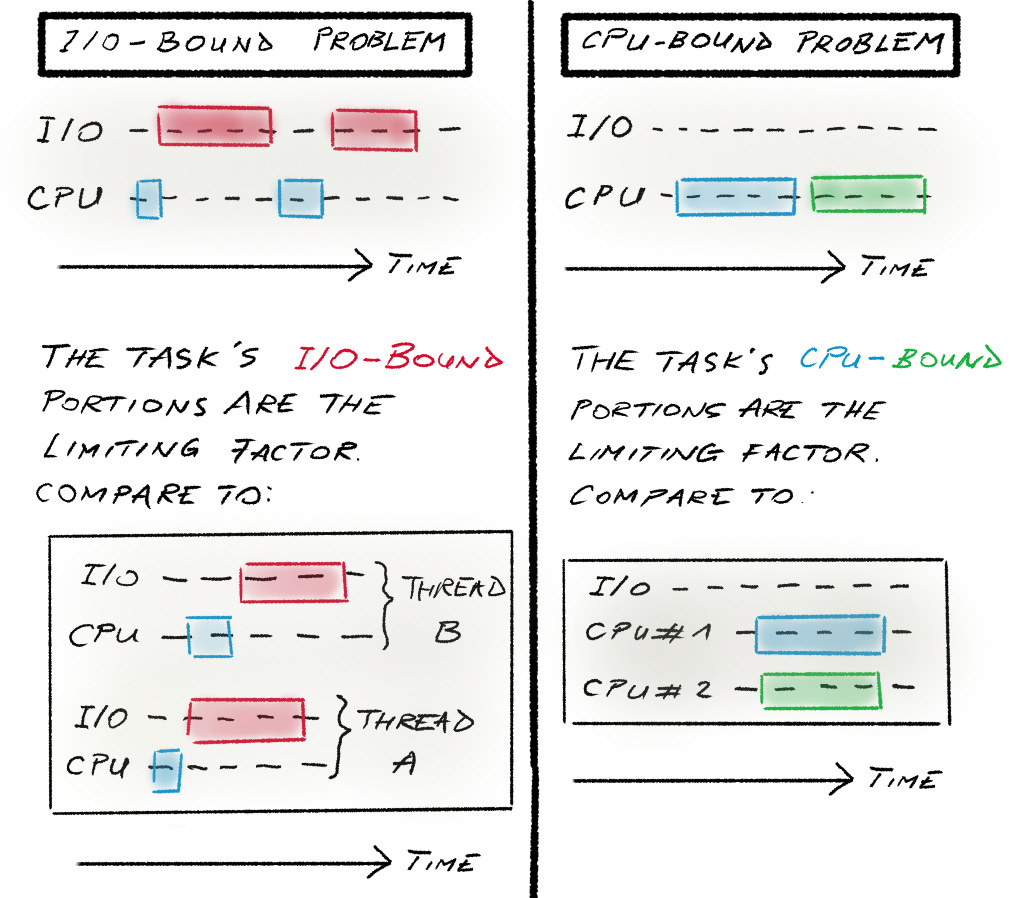
How to Recognize the Difference
The easiest question to ask is: is the program waiting or working? I/O bound programs spend large fractions of time in system calls or network waits, while CPU bound programs have high CPU utilization and minimal idle time. Profilers and system monitors reveal this clearly.
Understanding this distinction is crucial. If your service is I/O bound, buying a faster CPU will not help much. If it is CPU bound, increasing concurrency without improving the algorithm may even hurt due to context switching. Each type of bottleneck requires a targeted strategy.
Scaling Changes the Bottleneck
One subtle aspect that surprises many developers is how workloads can shift between I/O bound and CPU bound depending on scale and input. A small file parser might appear I/O bound because the CPU finishes calculations faster than the disk can deliver data. However, with larger files or more complex parsing logic, the same program can quickly become CPU bound. This dynamic interplay means that profiling and testing at realistic scales is critical.
For example, consider a Go program that reads JSON files and parses them:
func parseFiles(filenames []string) []map[string]interface{} {
    results := make([]map[string]interface{}, len(filenames))
    for i, file := range filenames {
        data, _ := os.ReadFile(file)
        var parsed map[string]interface{}
        json.Unmarshal(data, &parsed)
        results[i] = parsed
    }
    return results
}
For small files, reading from disk dominates the runtime. For very large files or complex structures, json.Unmarshal can become the CPU bottleneck. Adding goroutines to read small files may help, but on large files, naive concurrency can increase CPU contention and reduce cache efficiency, slowing things down.
The CPU-I/O Overlap in Modern Systems
Modern CPUs can do more than simply wait during I/O thanks to techniques like speculative execution, out-of-order execution, and Direct Memory Access. This allows computation and data transfer to partially overlap, creating hybrid bottlenecks where neither CPU nor I/O alone explains performance.
In Go, you can exploit this overlap using pipelines and channels:
func processFiles(filenames []string) {
    files := make(chan string)
    results := make(chan map[string]interface{})

    // Producer: reads files concurrently
    go func() {
        for _, file := range filenames {
            files <- file
        }
        close(files)
    }()

    // Consumers: parse files concurrently
    for i := 0; i < 4; i++ {
        go func() {
            for file := range files {
                data, _ := os.ReadFile(file)
                var parsed map[string]interface{}
                json.Unmarshal(data, &parsed)
                results <- parsed
            }
        }()
    }

    for range filenames {
        <-results
    }
}
Here, while one goroutine is blocked on disk I/O, others are busy parsing previously read files. This pipeline maximizes CPU utilization and hides I/O latency. Understanding how to design these overlapping workflows is key to squeezing the best performance from I/O heavy yet computationally intensive Go programs.
Why It Matters
Distinguishing between I/O bound and CPU bound workloads changes everything about how you design, optimize, and scale your software. It informs:
whether concurrency or parallelism is effective
which algorithms will have the greatest impact
how to allocate hardware resources efficiently
where to focus profiling efforts
For Go developers, this distinction is especially important. Go makes it easy to handle I/O bound workloads elegantly with goroutines, but raw CPU performance requires thoughtful use of cores and careful algorithmic design. Recognizing the bottleneck early saves hours of wasted optimization and leads to cleaner, faster, and more predictable software.
very insightful! learned a lot from this one ☝️