
Processes vs. Threads vs. Cores
Deconstructing the illusion of multitasking

“Concurrency is about dealing with lots of things at once. Parallelism is about doing lots of things at once.” — Rob Pike, Co-creator of Go
How does hardware execute code? While modern languages abstract this away, understanding the friction between the CPU’s rigid, sequential nature and the Operating System’s dynamic need to multitask is crucial for understanding why asynchronous programming exists.
1. Processes
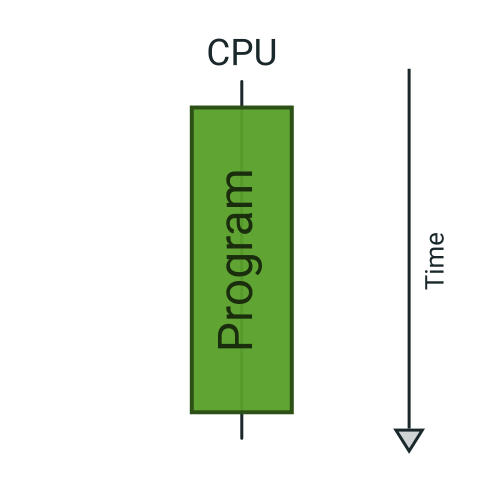
At the bare metal level, a CPU core is surprising simple. It is a sequential machine that rigorously follows a Fetch-Decode-Execute cycle. It acts like a relentless Pac-Man, consuming instruction dots one by one along a single path. It cannot natively “multitask”; it can only pause or resume.
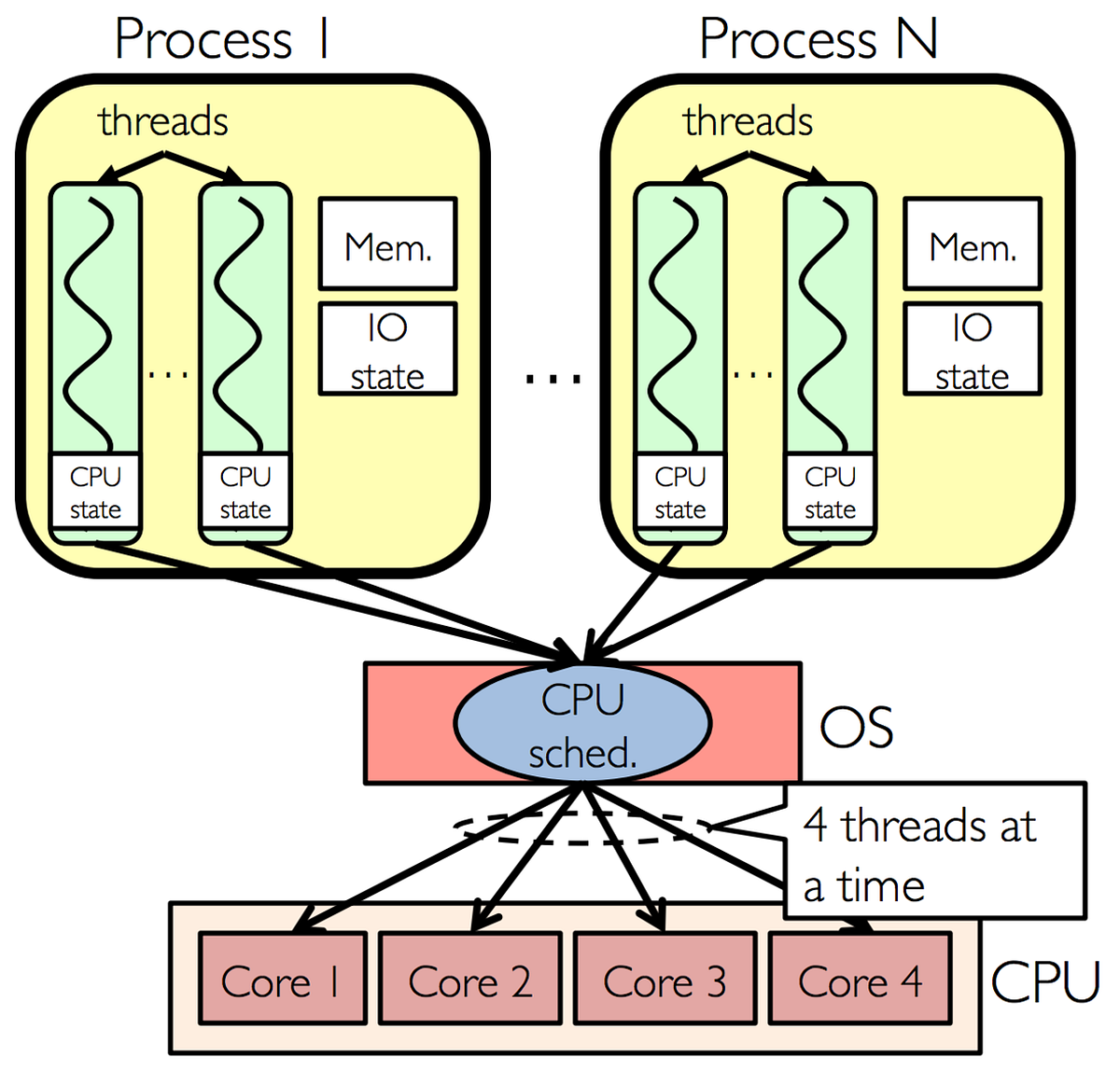
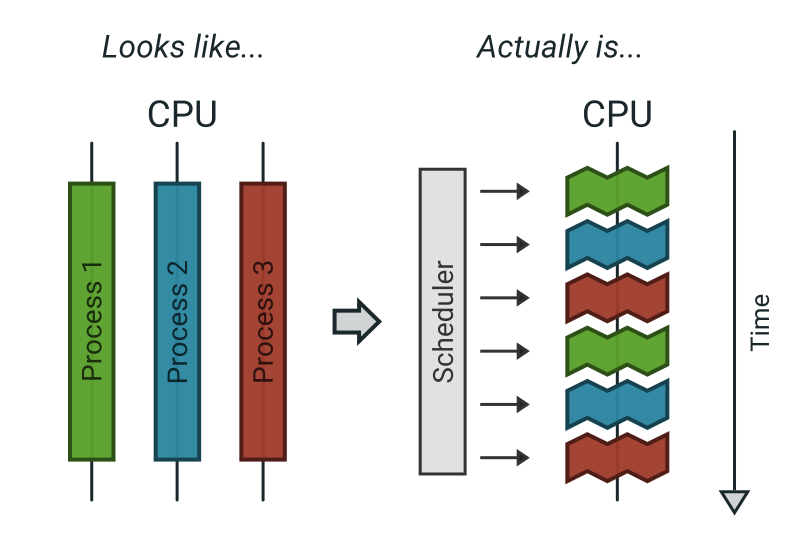
So, how does your computer run a browser, an IDE, and Spotify simultaneously on this sequential hardware? The Operating System (OS) creates the illusion of parallelism using Processes and a Preemptive Scheduler.
The Container. A Process is essentially a container for resources. It is a heavy, isolated entity holding a virtual memory address space, file handles, and security credentials. The OS isolates processes so that if one crashes or is compromised, it doesn’t take down the rest of the system.
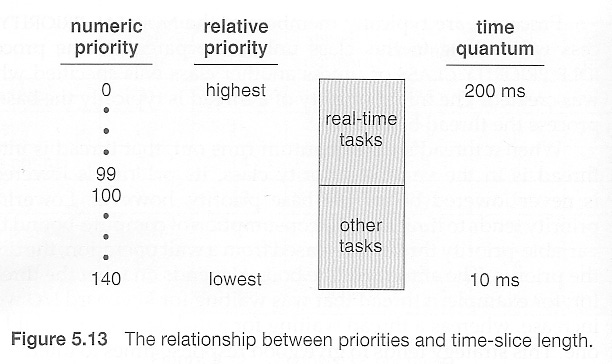
Time-Slicing. Because there are always more processes wanting to run than there are physical CPUs available, the OS implements time-sharing. The scheduler slices CPU time into tiny quantums (e.g., 10ms to 100ms).
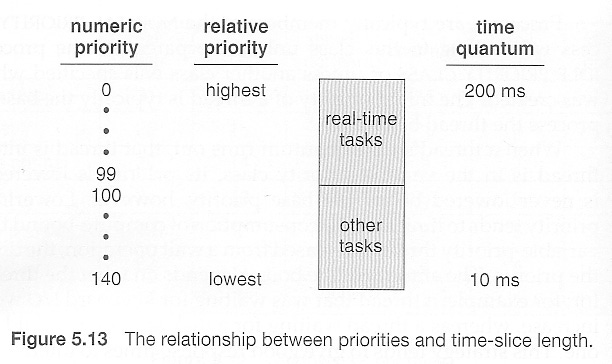
Preemptive Context Switching. The keyword is “preemptive.” The process has no say in the matter. When its time quantum expires, a hardware timer fires an interrupt. The OS kernel forcefully pauses the process, saves its entire state (registers, program counter) to memory, and loads the state of the next process waiting in line. This happens so fast that humans perceive it as continuous, simultaneous execution.

2. Threads
If the Process is the “house” (the container of resources), Threads are the occupants actually doing the work inside it.
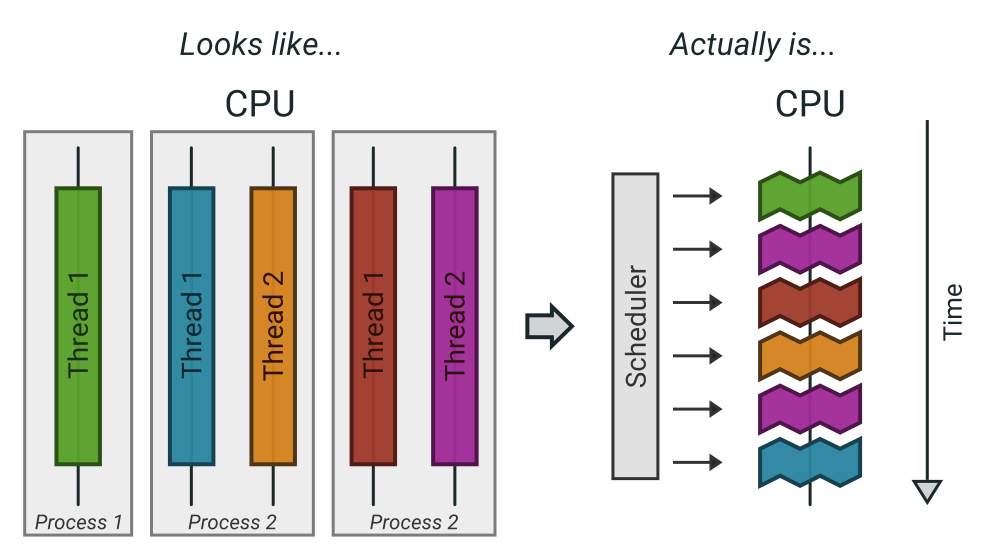
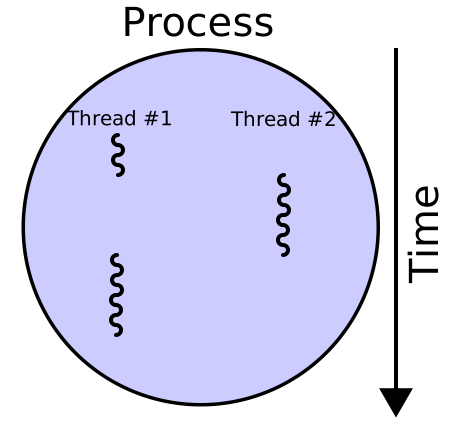
While processes are isolated and heavy, threads are “lightweight” because they exist within the same process boundary. The defining characteristic of threads is their memory model.
The Memory Distinction Diagram.
+---------------------------------------------------------+
|  PROCESS (Single Virtual Address Space)                 |
|                                                         |
|  >> SHARED RESOURCES (Accessible by all threads) <<     |
|  +---------------------------+  +--------------------+  |
|  | Heap Memory               |  | Code Segment       |  |
|  | (Dynamic allocations,     |  | (The actual        |  |
|  |  objects, global data)    |  |  instructions)     |  |
|  +---------------------------+  +--------------------+  |
|                                                         |
|  -----------------------------------------------------  |
|                                                         |
|  >> PRIVATE RESOURCES (Unique to each thread) <<        |
|  [ Thread A ]                [ Thread B ]               |
|  +-----------------+         +-----------------+        |
|  | Thread Stack    |         | Thread Stack    |        |
|  | (Local variables,         | (Local variables,        |
|  |  function calls)|         |  function calls)|        |
|  +-----------------+         +-----------------+        |
|  | CPU Registers   |         | CPU Registers   |        |
|  | (Program Counter)|        | (Program Counter)|       |
|  +-----------------+         +-----------------+        |
+---------------------------------------------------------+
Shared vs. Private. As shown above, threads in the same process share the massive Heap (permitting easy data exchange via shared variables). However, crucially, every thread maintains its own private Stack (to track its own function calls) and its own set of CPU Registers (to know where it currently is in the code).
The Scheduler’s View. In modern operating systems (like Linux or Windows), the scheduler primarily schedules threads, not processes. A “single-threaded” application is simply a process containing exactly one main thread.
𝐋𝐞𝐚𝐫𝐧 𝐭𝐨 𝐛𝐮𝐢𝐥𝐝 𝐆𝐢𝐭, 𝐃𝐨𝐜𝐤𝐞𝐫, 𝐑𝐞𝐝𝐢𝐬, 𝐇𝐓𝐓𝐏 𝐬𝐞𝐫𝐯𝐞𝐫𝐬, 𝐚𝐧𝐝 𝐜𝐨𝐦𝐩𝐢𝐥𝐞𝐫𝐬, 𝐟𝐫𝐨𝐦 𝐬𝐜𝐫𝐚𝐭𝐜𝐡. Get 40% OFF CodeCrafters: https://app.codecrafters.io/join?via=the-coding-gopher
3. Cores
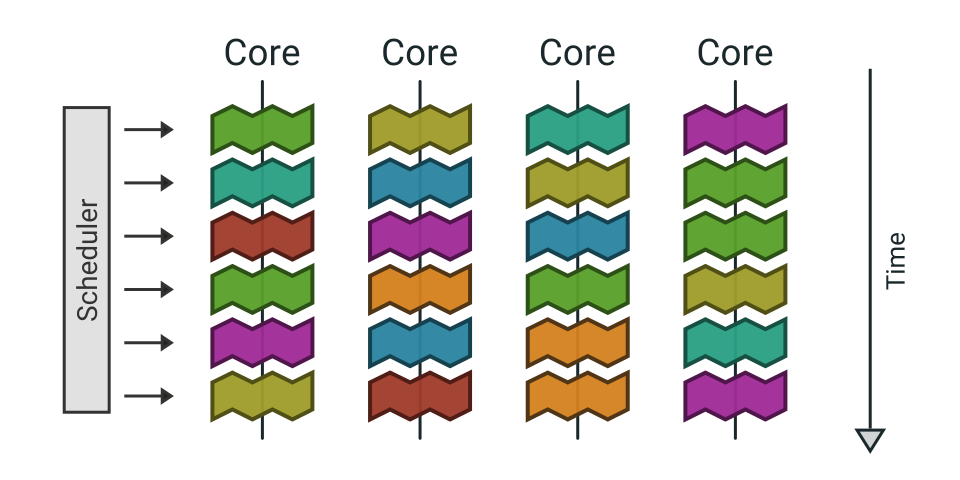
When we introduce a multi-core CPU, we finally move from concurrency (the illusion of parallelism via rapid time-slicing) to true parallelism (actual simultaneous execution).
Hardware Independence. A “Core” is a complete physical processing unit situated on the CPU die. Each core has its own independent hardware pipeline, L1/L2 caches, and register sets. A 4-core CPU can literally execute four different instruction streams at the exact same nanosecond.
Note: A CPU die is the tiny, actual silicon rectangle containing the complete processing circuitry (cores, cache, etc.) that gets cut from a larger silicon wafer, forming the "brain" of the processor before it is encased in its familiar package with pins, representing the core functional unit of the CPU.
Thread Migration. The OS scheduler is sophisticated enough to balance the load across these physical resources. It might run Thread A on Core 1 for a few milliseconds, pause it, and then resume it later on Core 2.
Even with multiple cores, we are almost always “thread-bound.” If you have an 8-core machine but 150 active threads competing for attention, the OS must revert to the preemptive time-slicing techniques described earlier to keep everyone moving.
TL;DR.
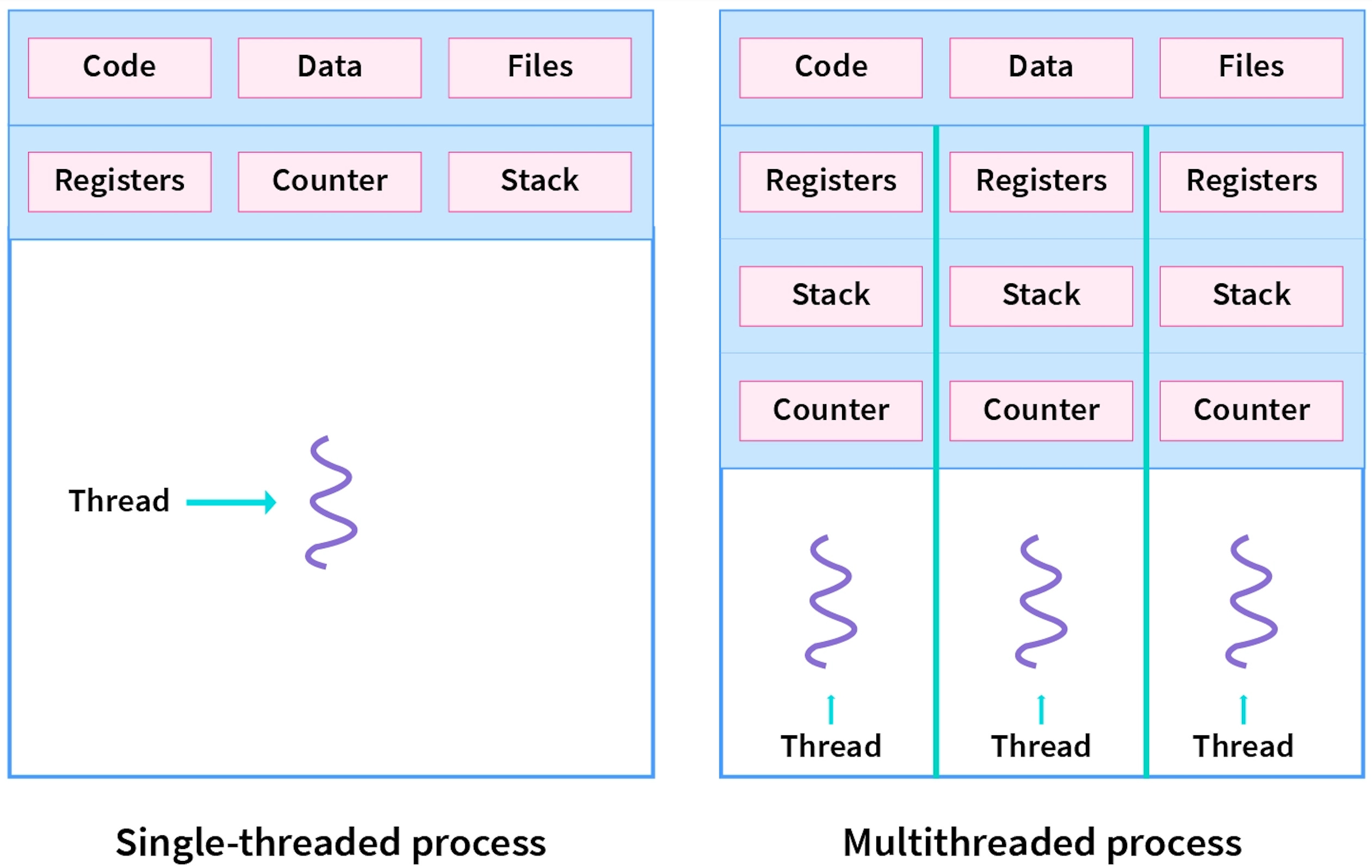
Processes are independent programs with their own memory, threads are lightweight execution units within a process that share memory, and cores are the physical hardware units (or logical units via hyperthreading) that actually execute threads, allowing for true parallel processing; think of a process as a factory, threads as different assembly lines within it, and cores as the actual workers (or hands) doing the work, where more cores and threads mean more simultaneous work.
This article is really valuable for every programmer and computer science students. I’m really enjoying the kind of basic concepts rather than some AI generated code.
This is a great breakdown