
Virtual Memory for Dummies
How Computers Think They Have More RAM Than They Actually Do

“Memory is the bridge between what a computer can do and what it thinks it can do.”
When I first started digging into how operating systems manage memory, I was surprised to learn that every program I run thinks it has access to a huge, continuous block of RAM. In reality, my laptop only has a limited amount of physical memory. This illusion is made possible by virtual memory, a clever system-level abstraction that decouples what a program sees from the actual physical memory installed in the machine. Understanding virtual memory is not just academic. It explains why multitasking works, why programs don’t crash each other, and why modern computers feel so responsive even under heavy loads.
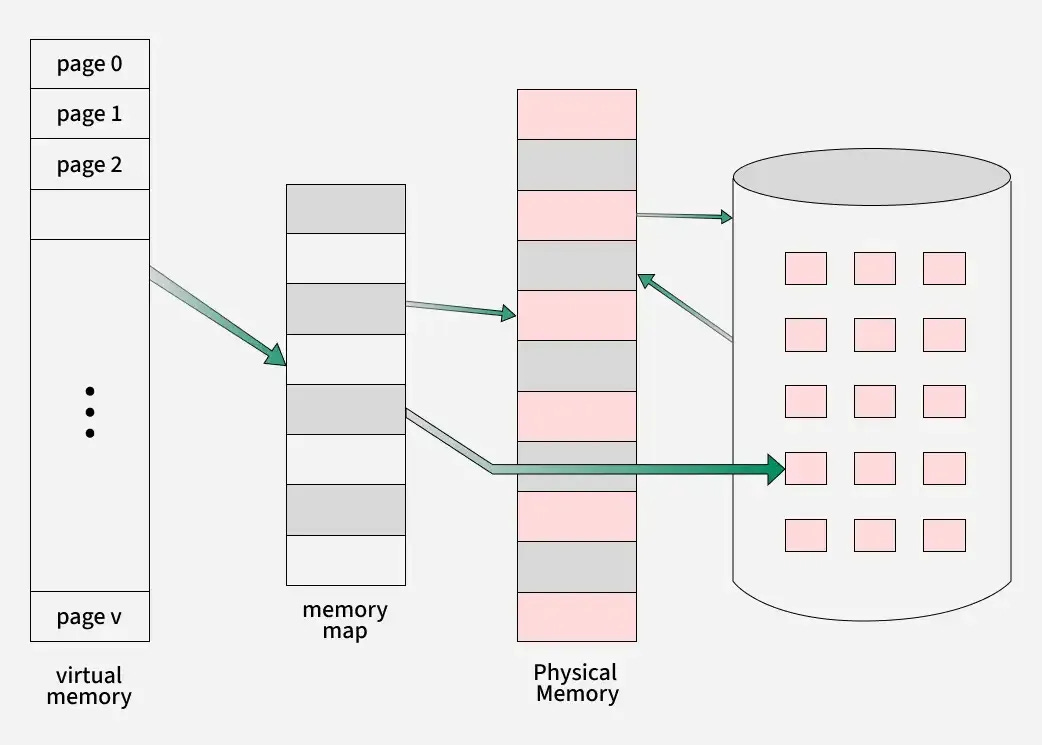
At its simplest, virtual memory allows a computer to pretend it has more RAM than it actually does. It does this by letting each process operate in its own virtual address space, a private set of memory addresses that the program uses to store data. The operating system, together with the hardware, translates these virtual addresses into physical addresses in RAM. If a process needs more memory than is currently available, the OS can temporarily move inactive data to hard disk or SSD, in a space called swap, and free up RAM for active processes. This is achieved by moving less-used data from RAM to a swap file on the disk, and swapping it back when needed.
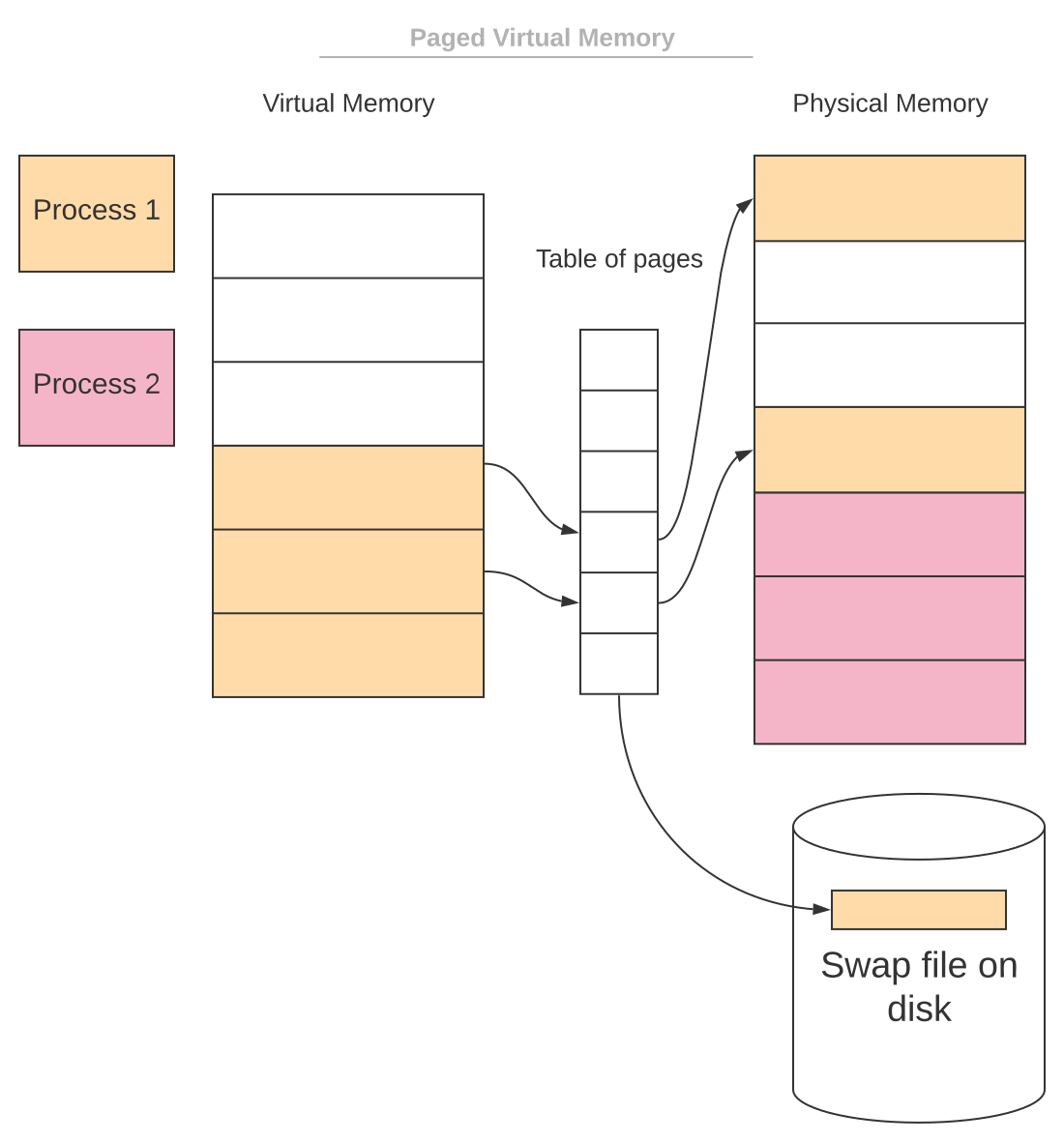
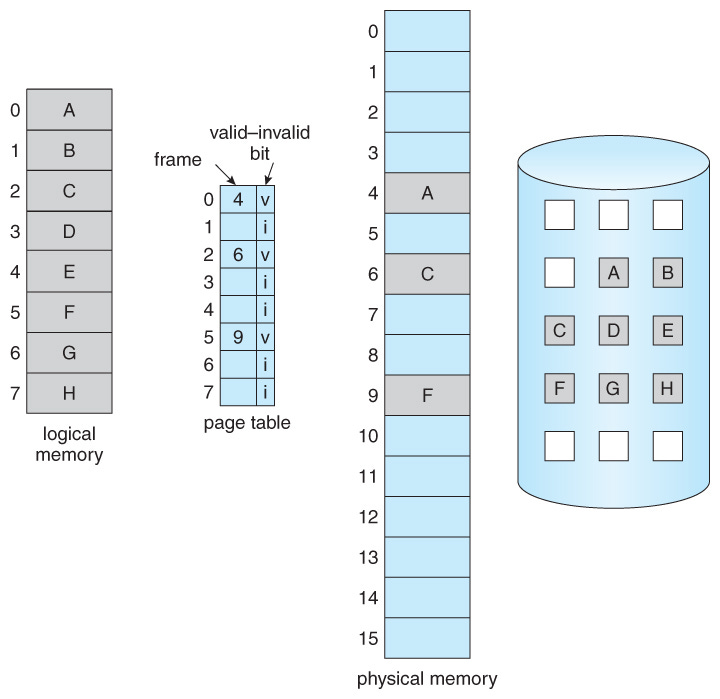
The mechanism behind virtual memory relies heavily on paging. Both virtual memory and physical memory are divided into fixed-size blocks called pages and frames, respectively. When a process accesses a virtual address, the CPU consults a page table to determine which frame in physical memory corresponds to that virtual page. This translation is handled by a component called the Memory Management Unit (MMU).
For speed, most systems use a small hardware cache called the Translation Lookaside Buffer (TLB) to store recent mappings and avoid repeated lookups in the page table.
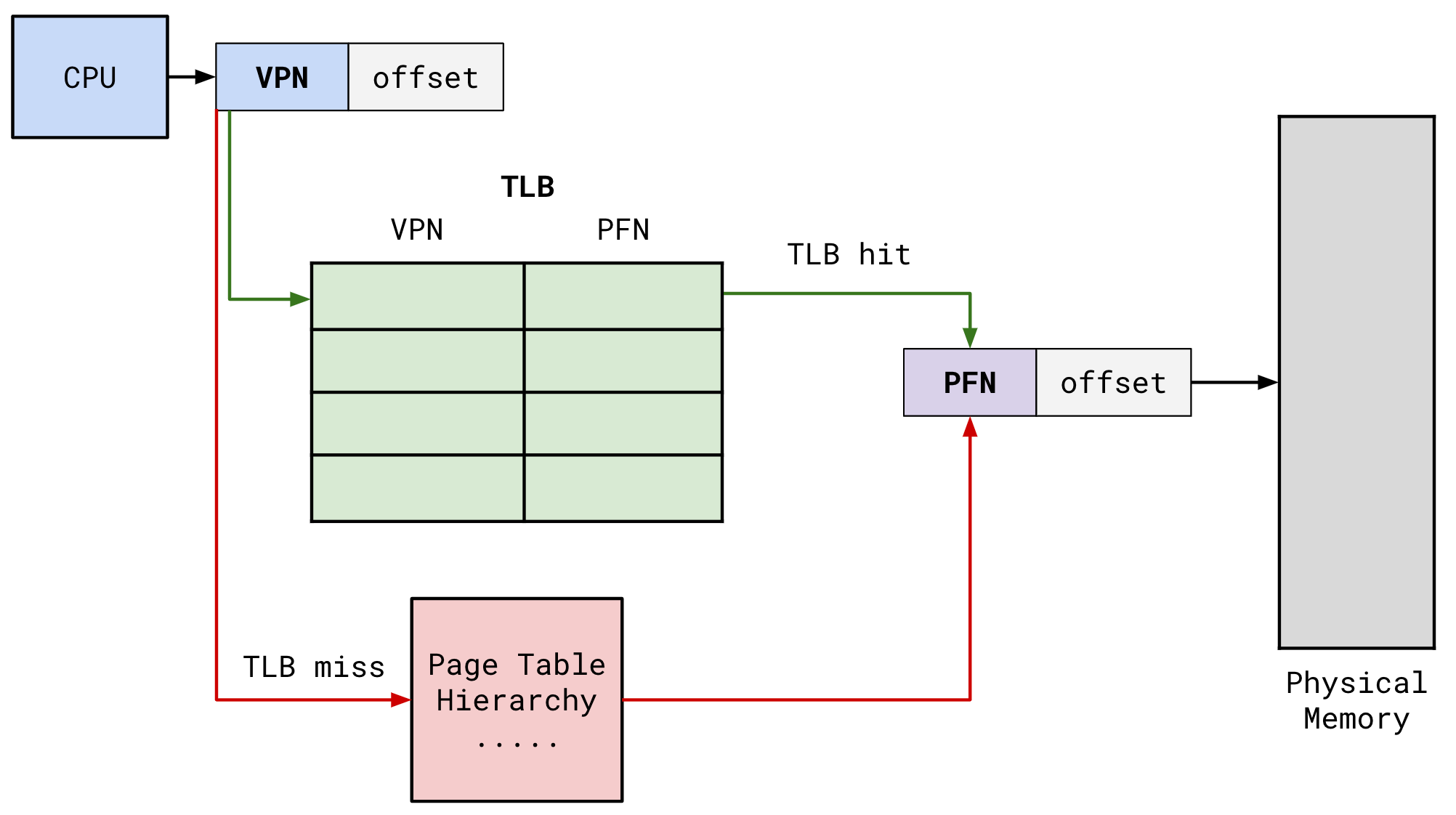
VPN (Virtual Page Number) and PFN (Physical Frame Number) are components in virtual memory management, where the VPN identifies a page in a process’s virtual address space, used to index the page table, while the PFN identifies the actual physical memory frame where that page is loaded, retrieved from the page table entry (PTE) to form the final physical address.
Virtual Page Number (VPN)
What it is. The part of a virtual memory address that points to a specific page in a process’s virtual address space.
Role. Acts as an index to look up the corresponding physical location in the page table.
Physical Frame Number (PFN)
What it is. The part of a physical memory address that identifies a physical memory block (frame).
Role. Stored in the page table entry (PTE), it’s the “destination” that the VPN leads to.
How they work together (Paging)
Virtual Address. A virtual address is split into a VPN and an offset (location within the page).
Page Table Lookup. The operating system uses the VPN as an index to find the correct Page Table Entry (PTE).
PFN Retrieval. The PTE contains the PFN for that virtual page.
Physical Address Calculation. The PFN is combined with the original offset to create the final physical address, allowing the CPU to access the data in RAM.
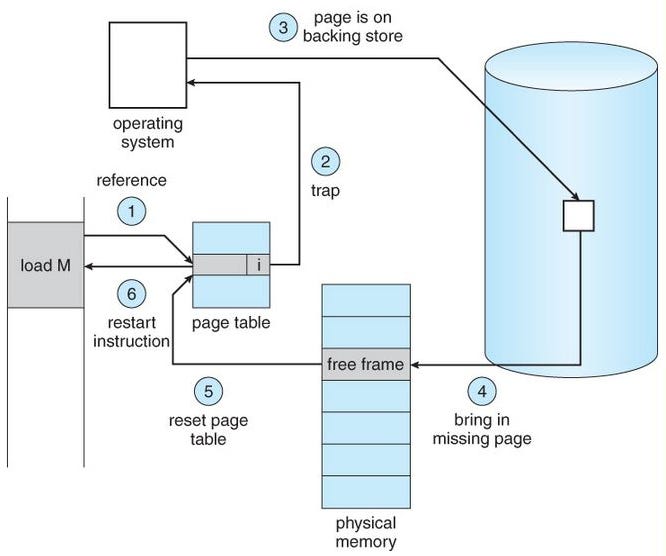
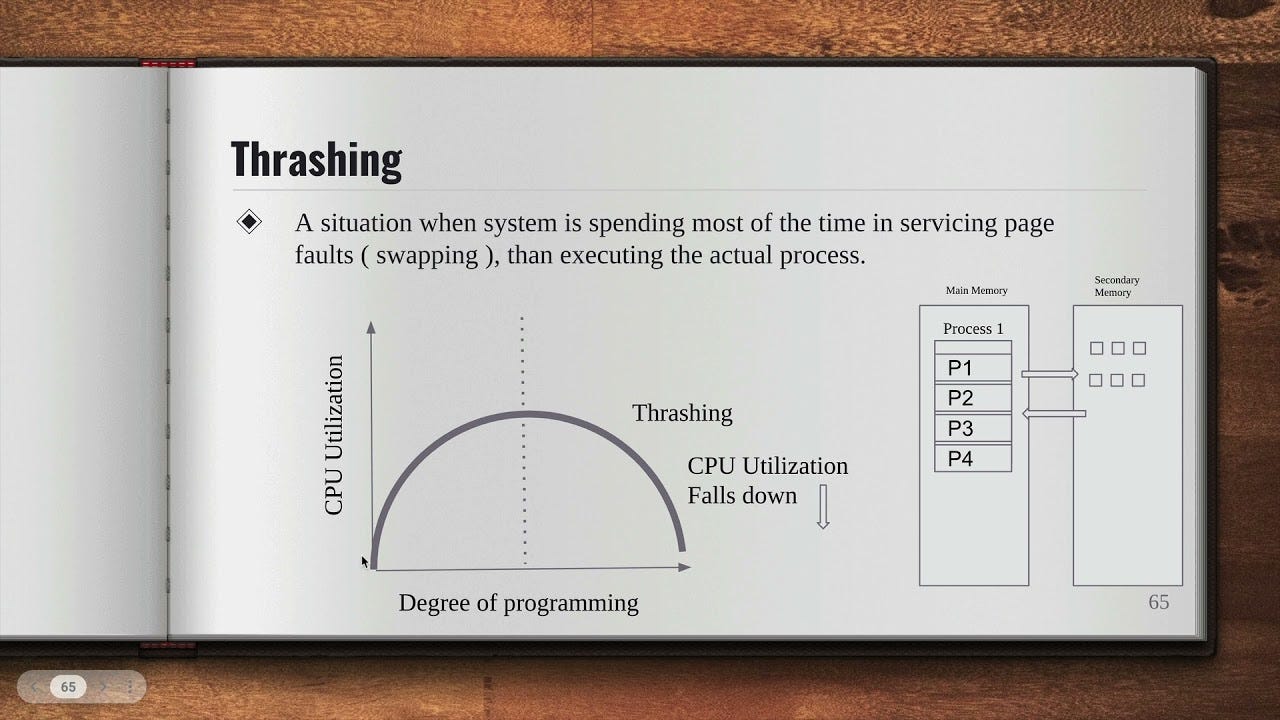
If a process tries to access a virtual page that is not currently loaded in RAM, the system experiences a page fault. When this happens, the operating system pauses the process, loads the required page from disk into RAM, updates the page table, and then resumes the process. While this allows programs to exceed physical memory limits, it comes at a cost: accessing pages on disk is much slower than accessing RAM. Too many page faults can lead to thrashing, where the system spends more time swapping pages than executing actual work.
The benefits of virtual memory are significant. It provides process isolation, so one program cannot accidentally overwrite another program’s memory. It enables efficient use of RAM, since only actively used data needs to reside in memory at any given time. It allows the system to overcommit memory, letting programs run even if the total requested memory exceeds the physical RAM. And for developers, virtual memory simplifies programming: they can work with large, continuous memory spaces without worrying about fragmentation or allocation details.
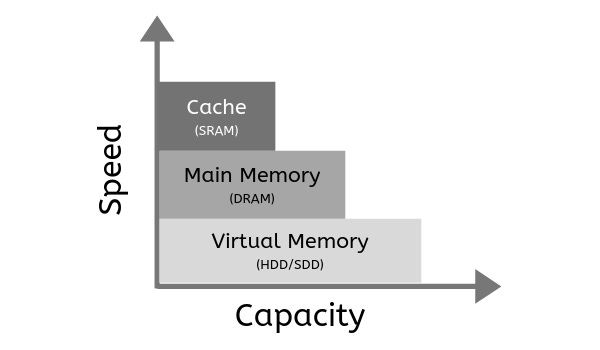
Cache, Main Memory (RAM), and Virtual Memory form a hierarchy. Cache is fastest but smallest, reducing CPU latency; RAM is medium speed/size, holding active programs; and Virtual Memory is slowest but largest, using disk space to extend RAM for huge programs, trading speed for massive capacity managed by the OS. This trade-off allows systems to efficiently balance performance (speed) with the ability to run large applications (capacity).
Cache Memory (L1, L2, L3)
Speed. Extremely fast (nanoseconds).
Capacity. Very small (KB to MB).
Role. Stores most frequently used data/instructions for immediate CPU access, reducing trips to RAM.
Management. Hardware (CPU).
Main Memory (RAM)
Speed. Fast, but slower than cache (hundreds of nanoseconds).
Capacity. Medium (GB).
Role. Holds actively running programs and data for the CPU.
Management. Operating System (OS) and hardware.
Virtual Memory
Speed. Very slow (milliseconds/disk access), as it uses secondary storage (SSD/HDD).
Capacity. Very large (GBs to TBs), limited by disk space.
Role. Extends RAM’s capacity by moving less-used data to disk (paging/swapping), allowing programs larger than physical RAM to run.
Management. Operating System (OS).
The Trade-Off
Speed vs. Size. As you go down the hierarchy (Cache → RAM → Virtual Memory), speed decreases significantly, but capacity increases dramatically.
Purpose. Cache optimizes frequent access speed; RAM provides working memory; Virtual Memory ensures large applications can run, prioritizing capacity over speed for inactive data.
Virtual memory also supports advanced features in modern operating systems, such as memory-mapped files, copy-on-write, and shared libraries, all of which rely on the abstraction of virtual addresses. Despite its advantages, it introduces trade-offs. Excessive reliance on swap can slow a system down dramatically, and TLB misses or fragmentation can add latency. Effective virtual memory management is therefore crucial for system performance and stability.
In short, virtual memory is the invisible layer that allows each program to act as if it has its own private, limitless memory space, while the operating system efficiently manages the underlying physical RAM. By combining paging, page tables, swap space, and hardware support, virtual memory is a cornerstone of modern computing, enabling multitasking, protection, and scalability in ways that make our computers feel smarter than they really are.
wish i read this before my exams!!!!