
What is an "Upsert"?
A portmanteau of "update" and "insert"

In database engineering, the simplest operations are often the most fraught. Typically, if you want to save data, you have to make a choice: Insert a new record or Update an existing one. If you choose wrong, the system either throws a “duplicate key” error or silently fails to update anything at all.
Manually checking for a record’s existence before every write creates a “Read-then-Write” bottleneck that can cripple high-traffic applications. This is where the Upsert comes in. A functional hybrid of “Update” and “Insert,” it allows you to send data to the database with a single instruction: If it’s there, change it; if it’s not, create it.
The Logic. One Command, Two Paths
At its core, an upsert is a conditional logic flow handled entirely by the database engine. Instead of your application sending multiple requests back and forth, it sends one command: “Here is the data; you figure out where it goes.”
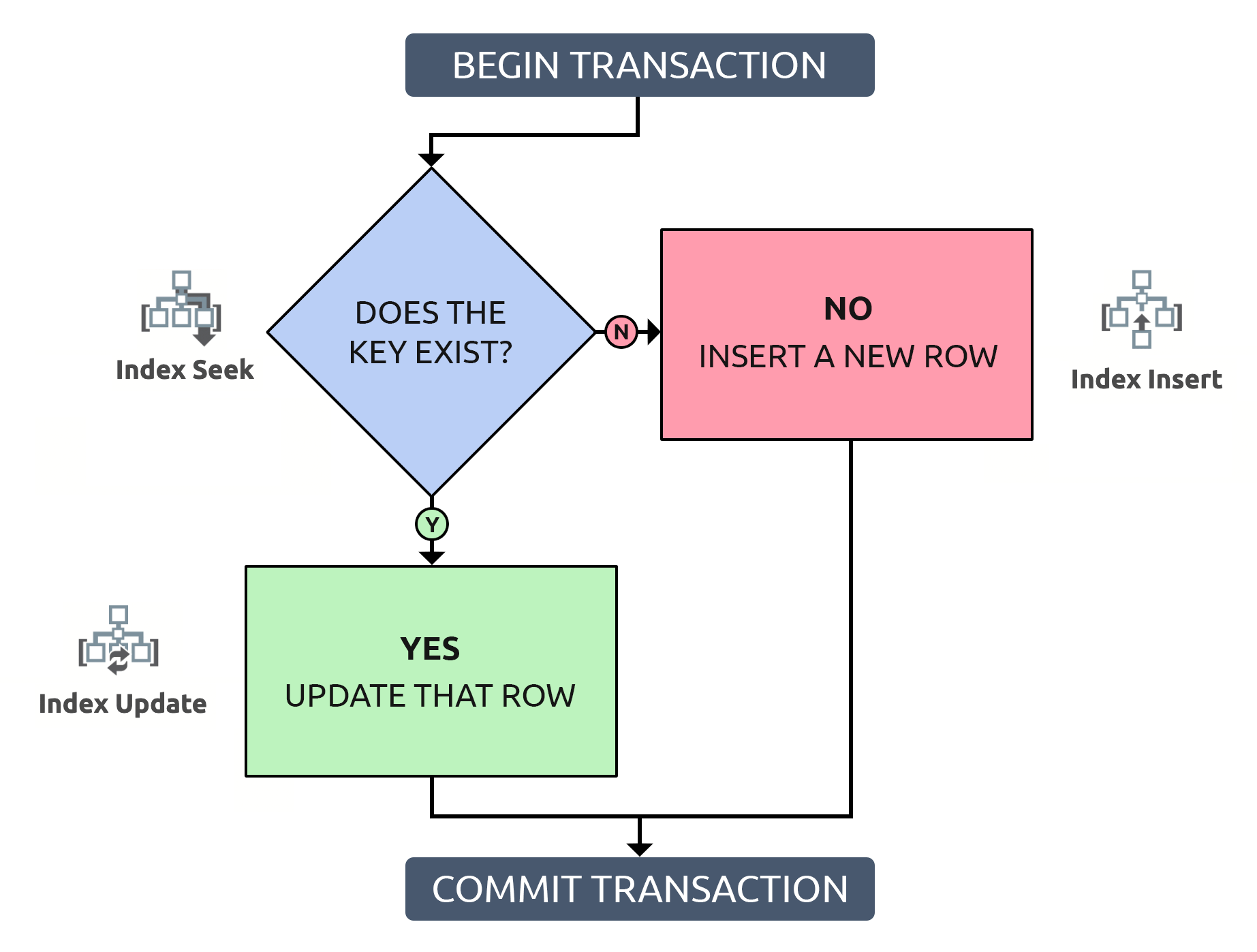
1. The Search (The “Unique Key”)
Every upsert relies on a Unique Identifier (often called a Primary Key or a Unique Constraint). This might be a User_ID, an Email_Address, or a Product_SKU. The database uses this key to scan its existing records.
2. The Decision Point
The Match (The Update). If the database finds a record with that specific key, it realizes, “Aha! I already know this person.” It then ignores the ‘Insert’ part of the command and simply overwrites the existing columns with the new information.
The Miss (The Insert). If the search comes up empty, the database concludes, “This is a stranger.” It then creates a brand-new row and fills in the details.
Why Developers Swear by It
If you’re building a modern app, the upsert is often your best friend for three specific reasons:
1. Eliminating “Race Conditions”
In high-traffic environments, two different users might try to create the same account at the exact same millisecond. If your code checks “Does this user exist?” and then waits a split second to “Insert,” another process might sneak in and create the user in that tiny gap. This leads to a crash. An upsert is atomic, meaning the check and the action happen as one inseparable movement, preventing these “collisions.”
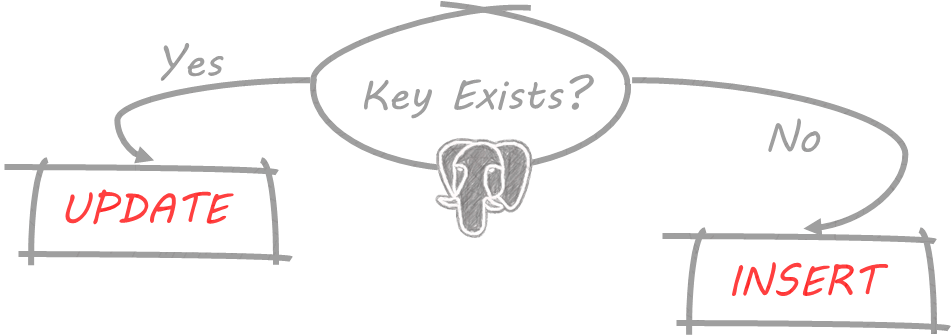
PostgreSQL (and SQLite)supports "upsert" functionality, primarily through the
INSERT ... ON CONFLICT ... DO UPDATEstatement, introduced in PostgreSQL 9.5. This means it attempts to INSERT a row, but if a conflict occurs due to a unique constraint violation (like a duplicate primary key), it instead UPDATES the existing row with the new values. It is concurrency-safe and efficient.
INSERT INTO table_name (column1, column2, ...)

VALUES (value1, value2, ...)

ON CONFLICT (conflict_target)

DO UPDATE SET column1 = EXCLUDED.column1, column2 = EXCLUDED.column2, ...;
INSERT INTO table_name (column1, column2, ...): Specifies the target table and the columns where data will be inserted.VALUES (value1, value2, ...): The data values that you are attempting to insert into the specified columns.ON CONFLICT (conflict_target): This clause is the core of the upsert logic. You must specify the unique constraint (e.g., a primary key column or a unique index name) that the database should check for a conflict.DO UPDATE SET column1 = EXCLUDED.column1, column2 = EXCLUDED.column2, ...: If a conflict is detected on theconflict_target, this action is performed.DO UPDATE SET: Indicates that the existing row should be modified.EXCLUDED: This is a special, virtual pseudo-table that references the values originally proposed for insertion in theVALUESclause.column1 = EXCLUDED.column1: This assigns the value from the attempted insert to the column in the existing table row. You can specify which columns to update, or even use expressions involving the existing data (e.g.,SET level = table_name.level + 1).
𝐋𝐞𝐚𝐫𝐧 𝐭𝐨 𝐛𝐮𝐢𝐥𝐝 𝐆𝐢𝐭, 𝐃𝐨𝐜𝐤𝐞𝐫, 𝐑𝐞𝐝𝐢𝐬, 𝐇𝐓𝐓𝐏 𝐬𝐞𝐫𝐯𝐞𝐫𝐬, 𝐚𝐧𝐝 𝐜𝐨𝐦𝐩𝐢𝐥𝐞𝐫𝐬, 𝐟𝐫𝐨𝐦 𝐬𝐜𝐫𝐚𝐭𝐜𝐡. Get 40% OFF CodeCrafters: https://app.codecrafters.io/join?via=the-coding-gopher
2. Reducing Network Latency
Every time your application talks to your database, there is “latency”—a tiny delay as data travels across the wire.
Without Upsert: Check (1 trip) + Receive Answer (1 trip) + Send Insert/Update (1 trip) = 3 trips.
With Upsert: Send Command (1 trip) = 1 trip.
In a system processing millions of rows, cutting your traffic by 66% is a massive performance win.
3. Simplified Data Syncing
Think about a fitness app syncing your steps from your watch to the cloud. If the cloud already has data for “Tuesday,” it should update it. If “Tuesday” doesn’t exist yet, it should create it. The upsert makes this logic invisible and seamless.
Syntax Across Major Database Systems
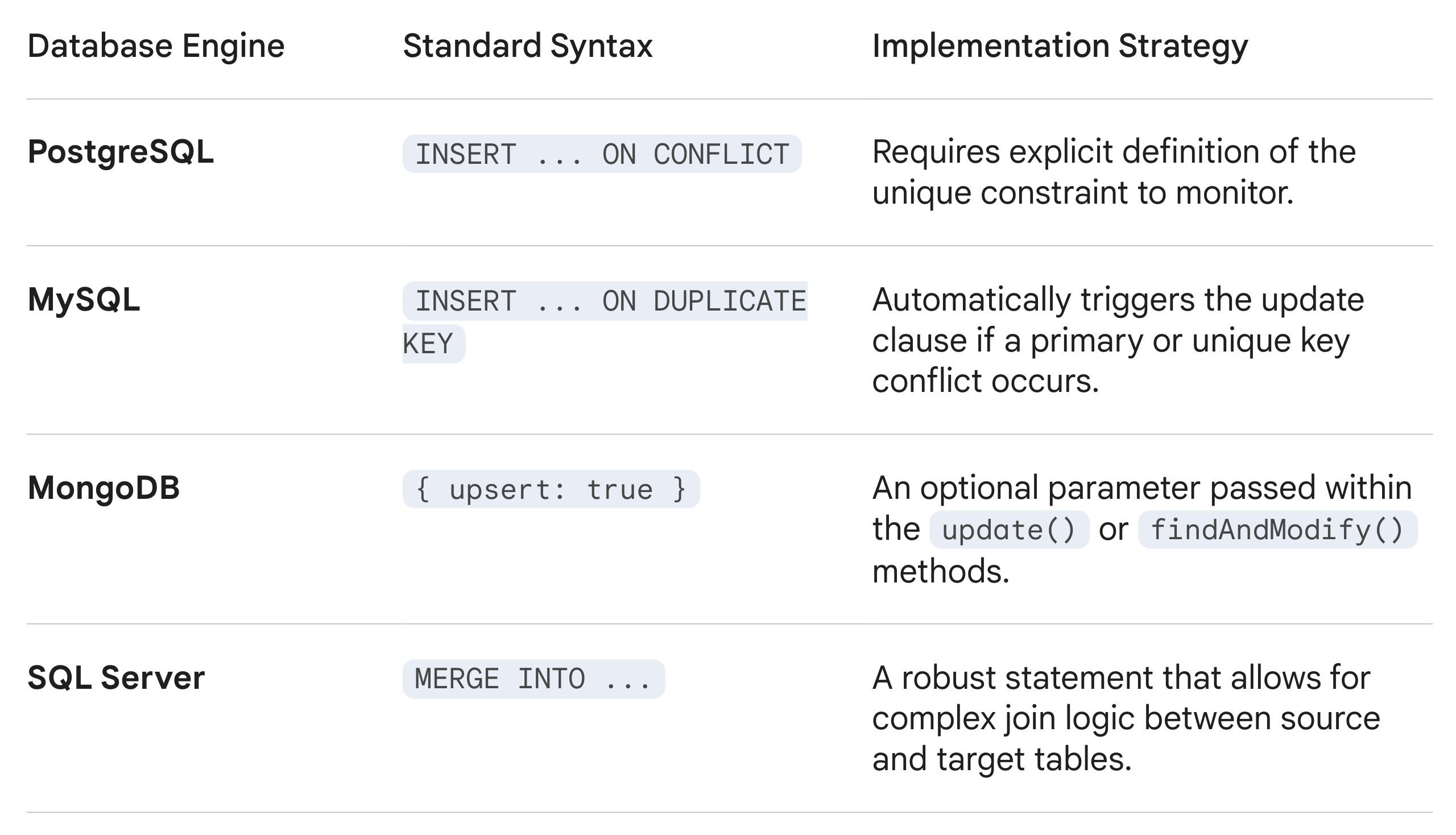
While the logic is universal, the implementation varies by the specific database engine. Below is how the most common systems handle the operation:
When to Be Careful
As powerful as the upsert is, it’s not a magic wand. You must have a Unique Index defined on the column you’re checking. If you try to upsert based on a name like “John Smith” without a unique ID, the database won’t know which “John Smith” to update, and you’ll end up with a mess of duplicate data.
The Bottom Line
The upsert is the ultimate “set it and forget it” tool for data integrity. It simplifies your code, protects your database from errors, and ensures that your records are always the most current version of the truth.