
Why Bun is Replacing Your Entire Toolchain
Deconstructing the Zig-powered, all-in-one runtime that makes Node.js look like dial-up

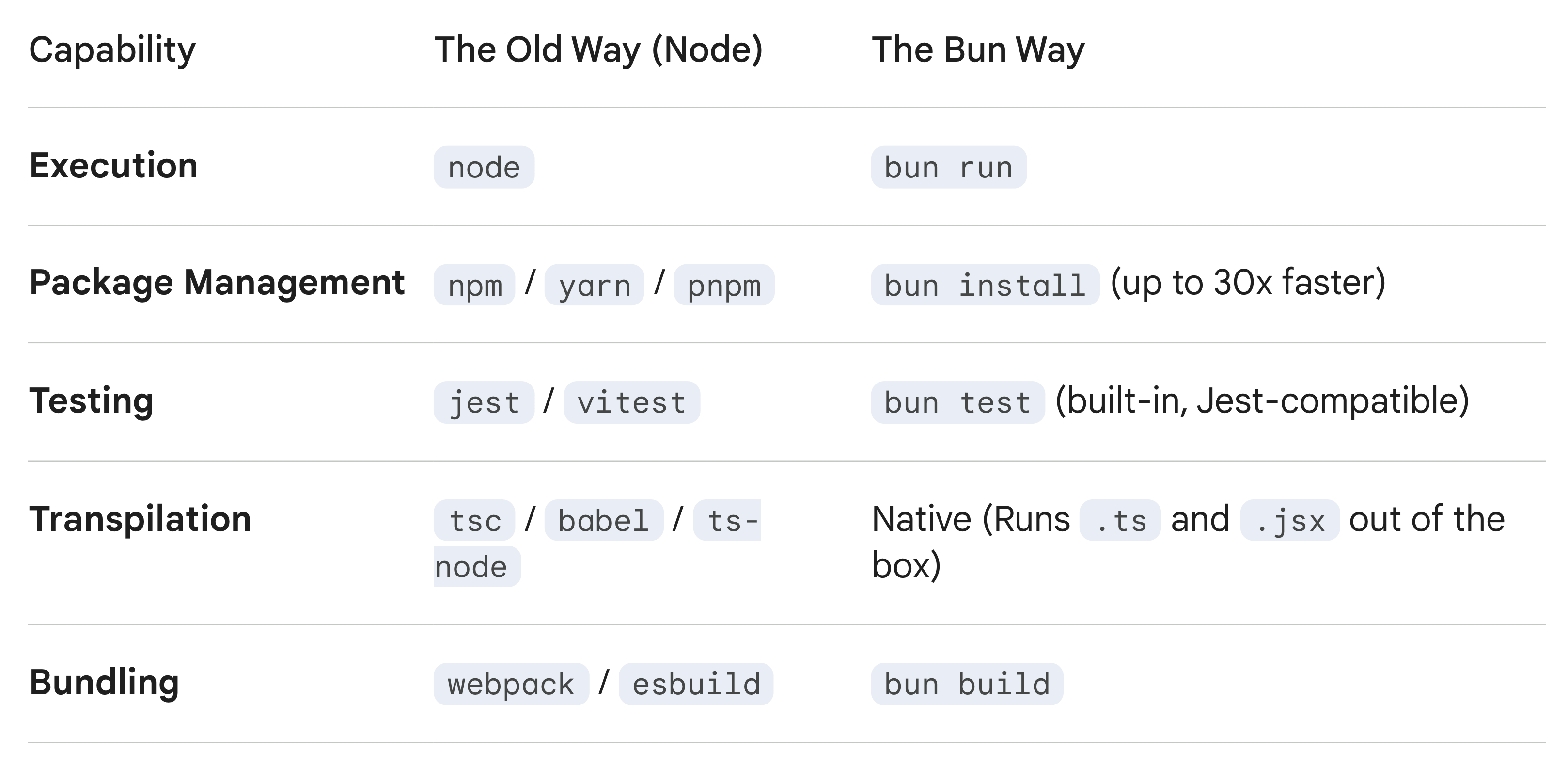
For over a decade, Node.js has been the undisputed king of server-side JavaScript. But as the ecosystem grew, it became fragmented. Today, booting up a standard TypeScript project feels like assembling a Frankenstein’s monster: you need Node to run it, npm or pnpm to install packages, Webpack or Vite to bundle it, Babel or tsc to transpile the TypeScript, and Jest to test it.
Every tool adds a new configuration file, a new bottleneck, and a few more seconds of waiting.
Enter Bun. Conceived by Jarred Sumner and now backed by a dedicated team at Oven, Bun isn’t just another runtime. It is a massive reset for the JavaScript ecosystem—a single, incredibly fast binary designed to replace your entire toolchain.
Here is a look under the hood at how Bun achieves its blistering performance and why developers are migrating their stacks to it.
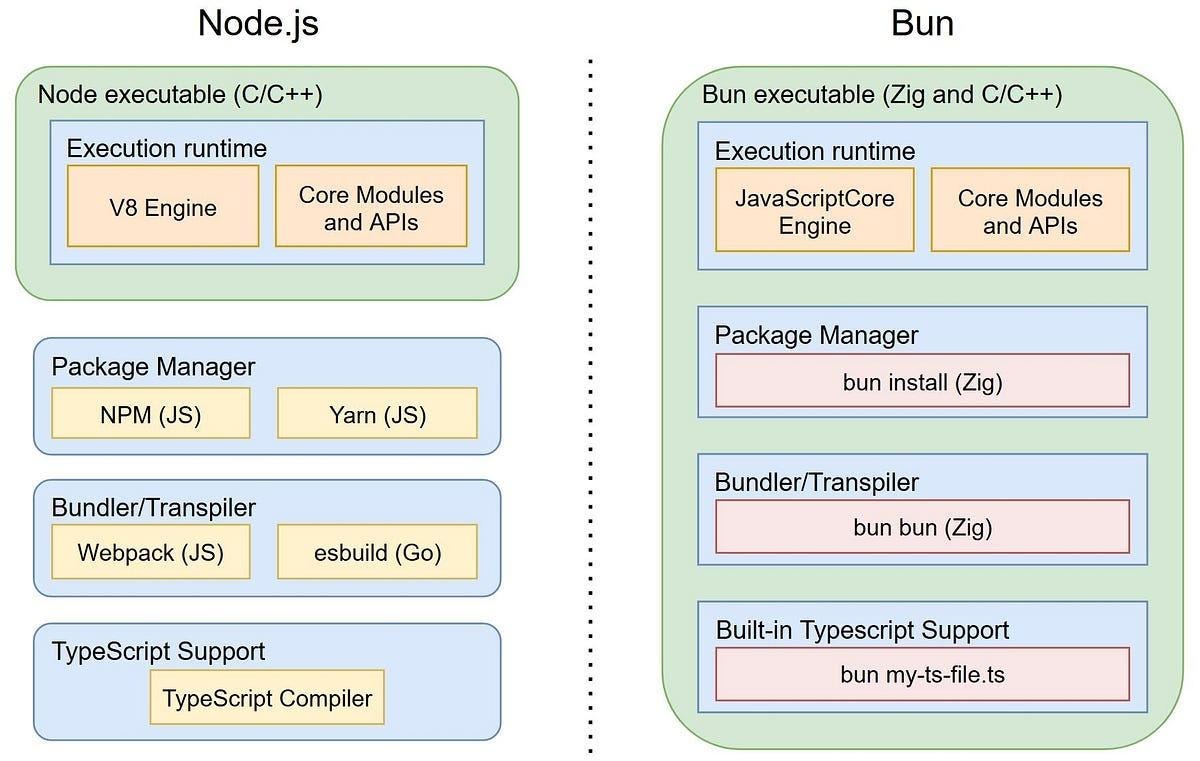
1. The Core Architecture: JavaScriptCore and Zig
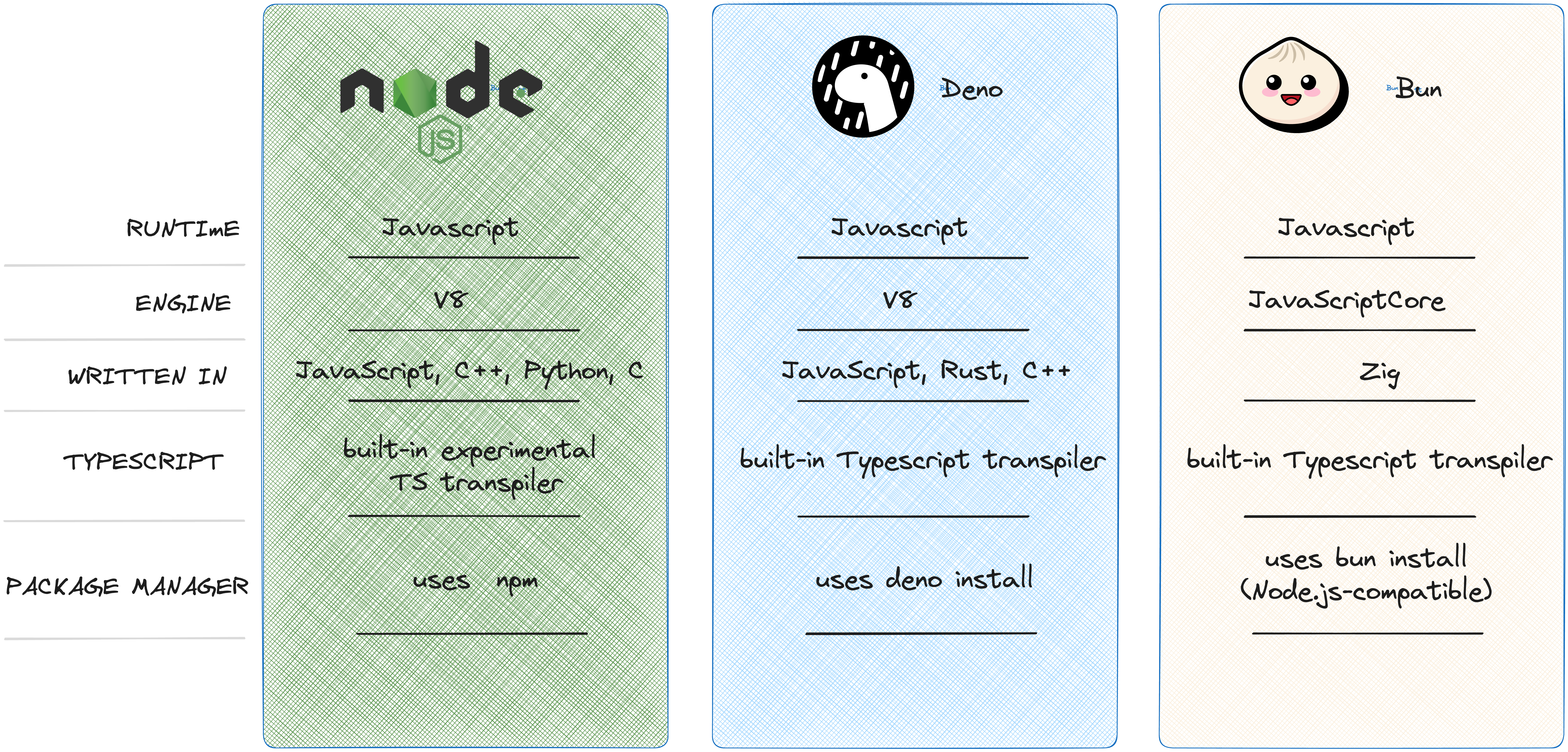
When building a new JavaScript runtime, the default industry move is to use Google’s V8 engine (the engine powering Chrome, Node.js, and Deno). Bun made a radically different architectural choice that defines its performance characteristics.
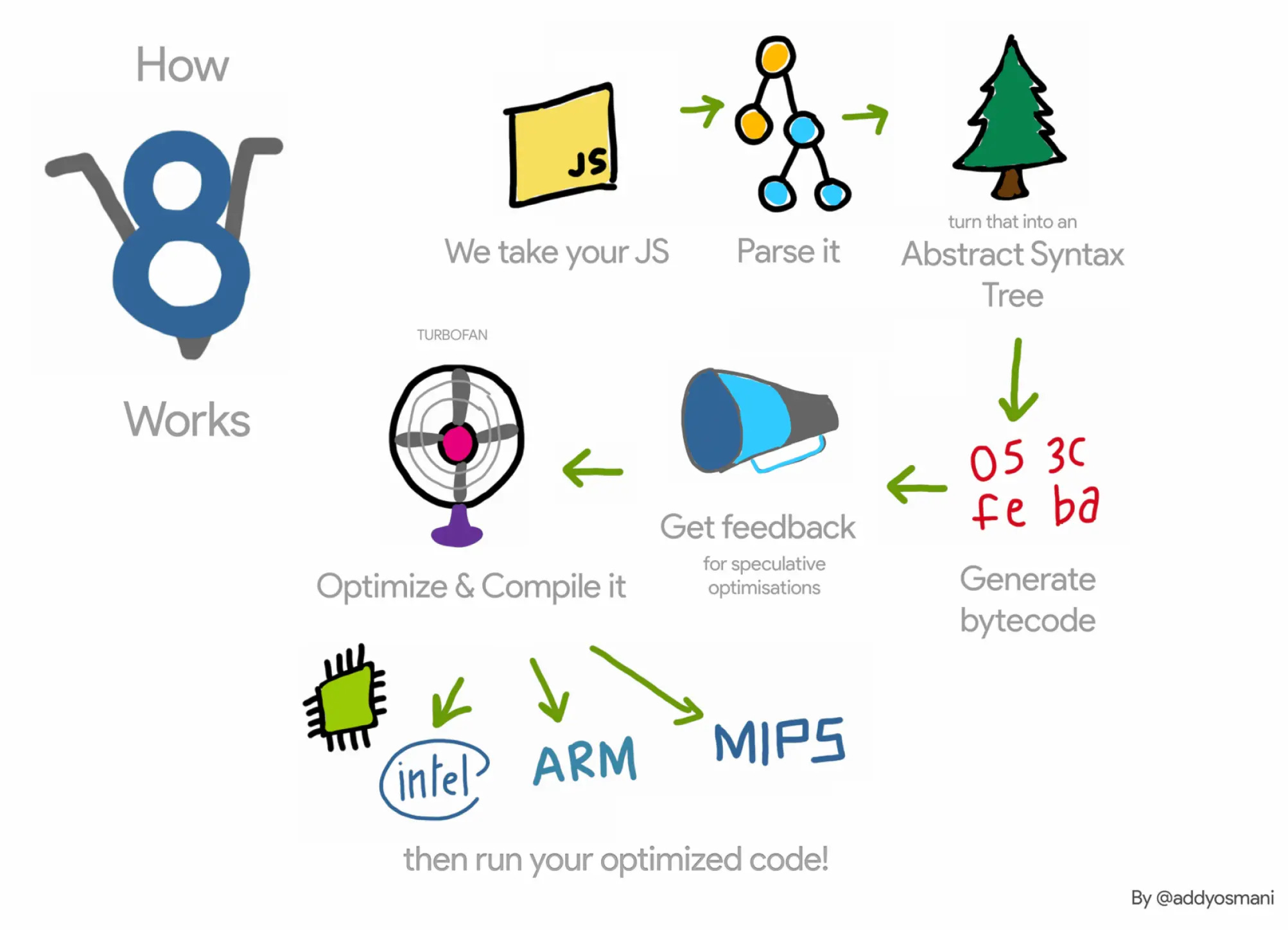
The Safari Secret: JavaScriptCore
Instead of V8, Bun uses JavaScriptCore (JSC), the open-source engine developed by Apple for Safari.
The V8 Trade-off: V8 is highly optimized for long-running processes. It takes its time to heavily analyze and compile code so that it runs incredibly fast eventually. This is great for a browser tab that stays open all day, but terrible for serverless functions that need to boot up instantly.
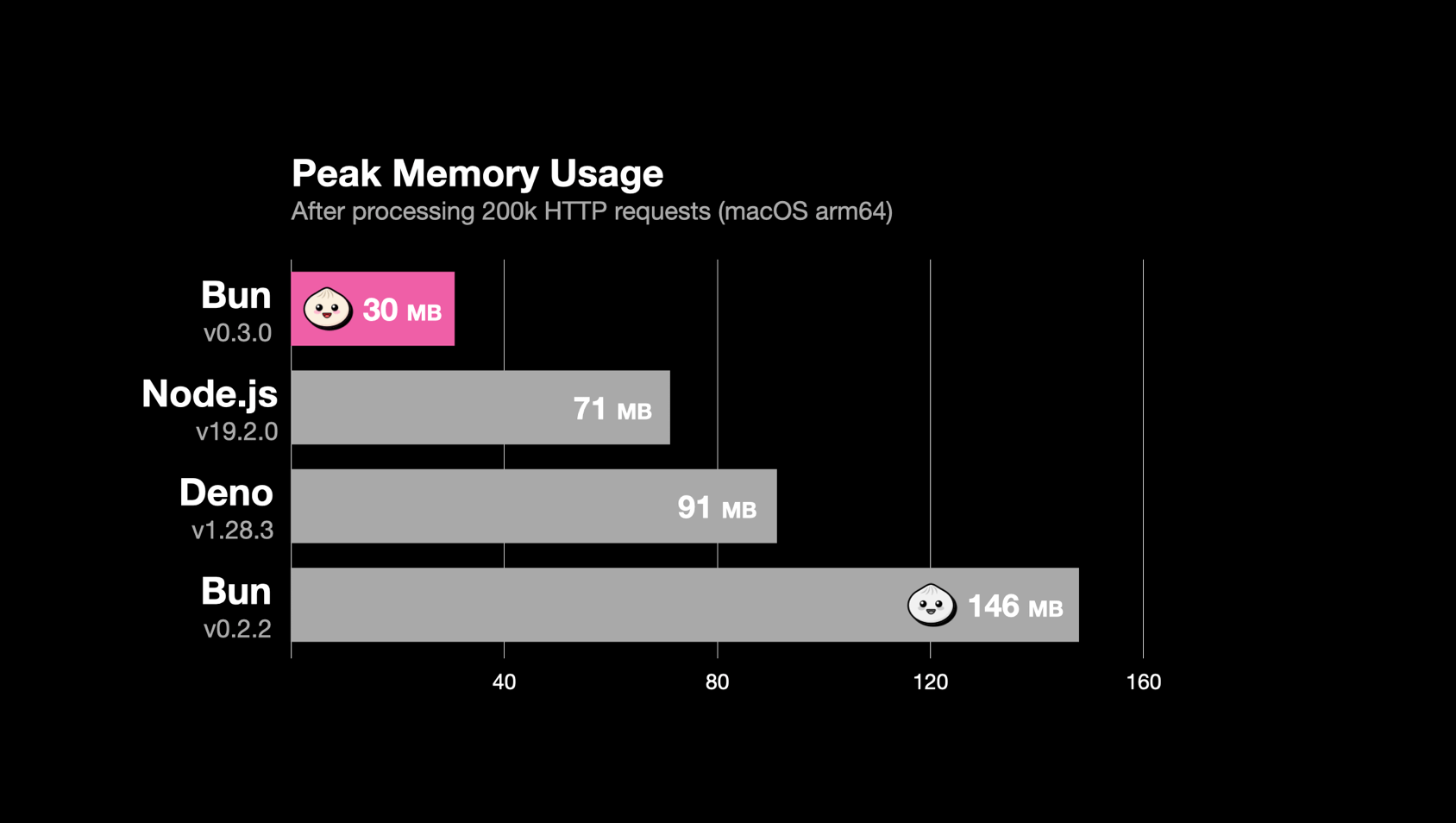
The JSC Advantage: JavaScriptCore prioritizes startup time and memory efficiency. By leveraging JSC, Bun boots up roughly 3x to 4x faster than Node.js. In an era of edge computing and serverless architectures—where “cold starts” are the enemy—this millisecond-level initialization is a game-changer.
Built with Zig
While Node is written in C++ and Deno is written in Rust, Bun is written in Zig. Zig is a relatively new, low-level systems programming language designed to replace C. It provides intense, granular control over memory management without hidden control flows. This allowed the Bun team to hand-tune memory allocations, resulting in a runtime that processes HTTP requests and manipulates files with virtually zero overhead.
2. The “All-in-One” Philosophy
Bun’s true superpower is consolidation. It ships as a single, dependency-free executable that natively handles the jobs of five different tools.
The Package Manager
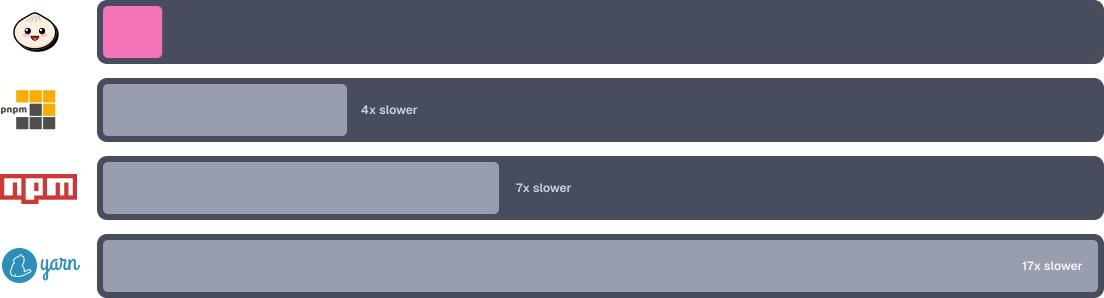
One of the most immediate “wow” moments for new Bun users is running bun install. It uses a global module cache and deeply integrated OS-level system calls to install packages locally. In massive monorepos, an npm install that takes 45 seconds can often be completed by Bun in less than 2 seconds.
𝐋𝐞𝐚𝐫𝐧 𝐭𝐨 𝐛𝐮𝐢𝐥𝐝 𝐆𝐢𝐭, 𝐃𝐨𝐜𝐤𝐞𝐫, 𝐑𝐞𝐝𝐢𝐬, 𝐇𝐓𝐓𝐏 𝐬𝐞𝐫𝐯𝐞𝐫𝐬, 𝐚𝐧𝐝 𝐜𝐨𝐦𝐩𝐢𝐥𝐞𝐫𝐬, 𝐟𝐫𝐨𝐦 𝐬𝐜𝐫𝐚𝐭𝐜𝐡. Get 40% OFF CodeCrafters: https://app.codecrafters.io/join?via=the-coding-gopher
3. Native Batteries Included
Because Bun controls the entire stack from the engine up, it includes highly optimized, built-in APIs for things developers do every day, eliminating the need for heavy third-party libraries.
Zero-Config TypeScript: You do not need a
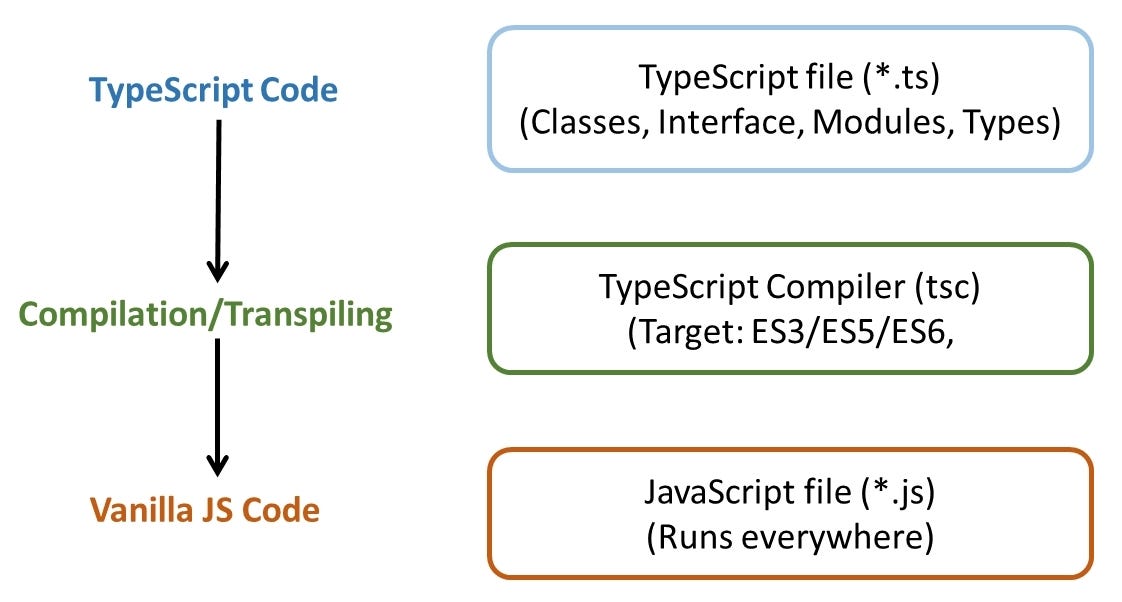
tsconfig.jsonjust to run a file. You can create a file calledserver.tsand instantly execute it withbun server.ts. Bun transpiles the TypeScript to JavaScript in memory on the fly.
Web Standards First: Unlike early Node, which had to invent its own APIs (like
requireandBuffer), Bun natively supports modern web standards.fetch,WebSocket,ReadableStream, andURLare built-in and highly optimized.Built-in Database Drivers: Bun includes native, hyper-fast drivers for SQLite, PostgreSQL, and MySQL directly in the runtime. No ORM or external driver installation is required to execute basic queries.
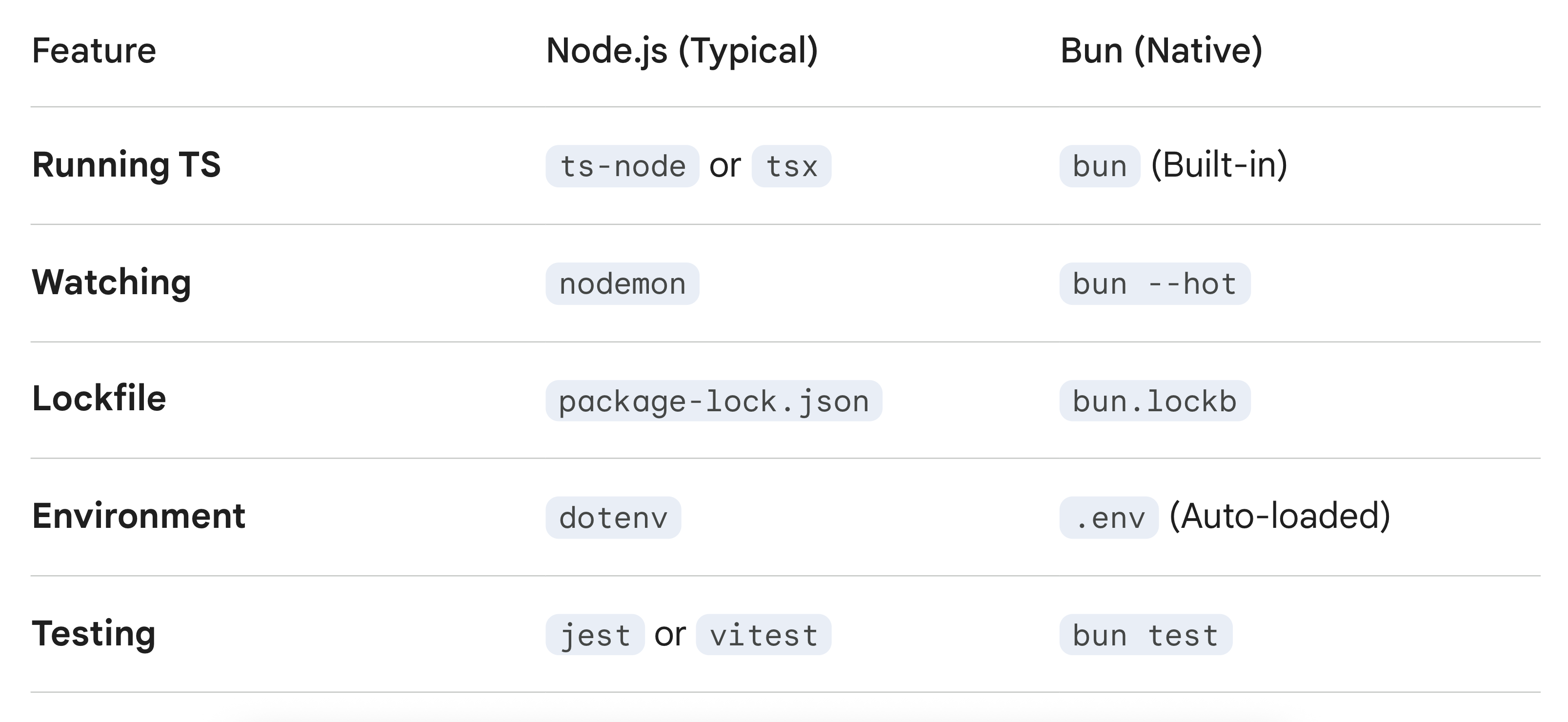
Bun is a breath of fresh air if you’re tired of the “tooling tax” in the Node.js ecosystem. Because Bun has a built-in TypeScript transpiler, you don’t need tsc, ts-node, or nodemon.
Here is how to get a native server running and how to bring your existing Node project along for the ride.
The “Native” Way: Bun.serve
Bun’s native HTTP server is built directly into the runtime. It uses the Web Standard Request and Response objects, making it incredibly fast and familiar if you’ve done any frontend fetch work.
Create a file named server.ts:
// server.ts
const server = Bun.serve({
  port: 3000,
  fetch(request) {
    const url = new URL(request.url);

    if (url.pathname === "/") {
      return new Response("Home Page!");
    }

    if (url.pathname === "/api") {
      return Response.json({ message: "Hello from Bun!" });
    }

    return new Response("404 Not Found", { status: 404 });
  },
});

console.log(`Listening on ${server.url}`);
To run it:
bun --hot server.ts(The --hot flag gives you instant reload without needing extra packages like nodemon.)
Migrating an Existing Node Project
Since Bun is designed as a “drop-in” replacement for Node, you don’t usually have to rewrite your code. The migration is mostly about swapping the underlying tools.
Step 1: Swap the Package Manager
Delete your node_modules and your existing lockfile (package-lock.json or yarn.lock). Then, run:
bun installBun will generate a bun.lockb file. It’s binary and significantly faster than text-based lockfiles.
Step 2: Update package.json Scripts
Change your scripts to use the bun runtime instead of node or ts-node.
{
  "scripts": {
    "start": "bun run src/index.ts",
    "dev": "bun --hot src/index.ts",
    "test": "bun test"
  }
}
Types and APIs
If you are using Node-specific globals (like process or __dirname), Bun supports most of them. However, for the best experience, you should add Bun’s types:
bun add -d @types/bunIn your tsconfig.json, ensure you include them:
{
  "compilerOptions": {
    "types": ["bun-types"]
  }
}
Comparison: Node vs. Bun Workflow
A Quick Heads-up: While Bun supports 95% of Node APIs, very specific native C++ addons (like some older versions of
sharporbcrypt) can occasionally be picky. If your project relies on heavy native bindings, runbun testimmediately after migrating to catch any edge cases.
Note: Native bindings are code wrappers or interfaces ("glue code") that allow high-level languages (like JavaScript, Python, or C#) to call and execute functions from libraries written in low-level languages (like C, C++, or Rust) or platform-specific APIs. They are crucial for performance, accessing native hardware (camera, GPS), and reusing existing libraries.
The Verdict
Is Node.js dead? Absolutely not. Node has over a decade of battle-tested stability, a massive enterprise footprint, and 100% compatibility with every obscure package on NPM. While Bun aims for full Node compatibility (and is currently hovering around 99%), edge cases in legacy libraries still exist.
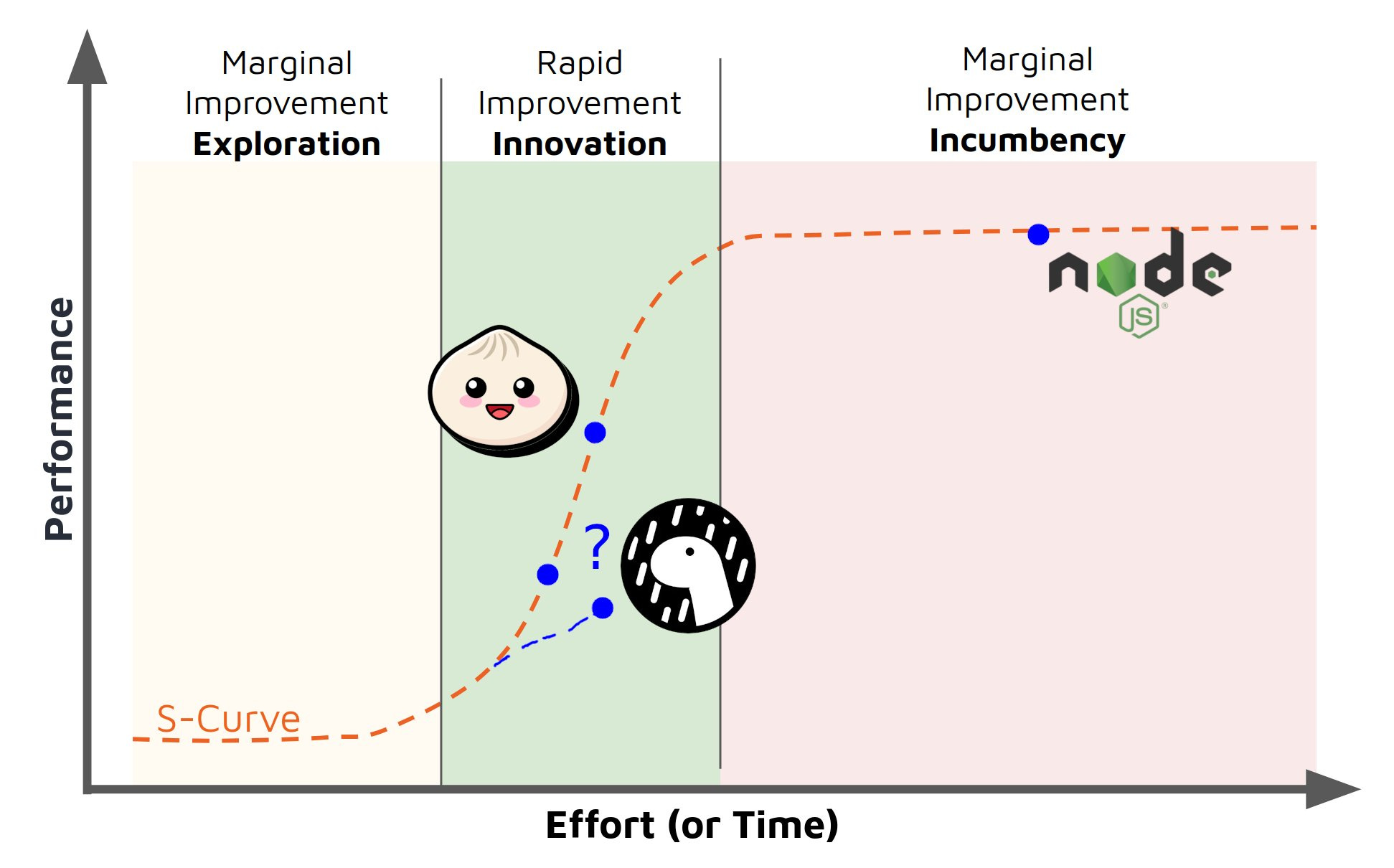
However, for greenfield projects, serverless API deployments, and developers who are exhausted by configuration file fatigue, Bun represents the undisputed future of JavaScript. It takes the heavy lifting off the developer and puts it back where it belongs: in the runtime.
this was very well written 🙏